Loading
Get Canada Royal Air Force Band Dnd Request Form 2015-2026
How it works
-

Open form follow the instructions
-

Easily sign the form with your finger
-

Send filled & signed form or save
How to fill out the Canada Royal Air Force Band DND Request Form online
This guide provides a clear and comprehensive overview of how to complete the Canada Royal Air Force Band DND Request Form online. Follow these detailed steps to ensure your request is correctly submitted for your event.
Follow the steps to successfully fill out the request form.
- Use the 'Get Form' button to access the DND Request Form and open it in your preferred editor.
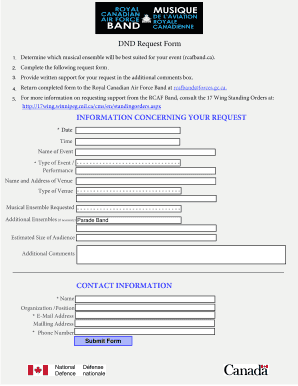
- Identify and select the musical ensemble that best suits your event. You can refer to the website rcafband.ca for assistance in this decision.
- Complete the request form by providing all required information. Make sure to accurately fill in the date, time, and name of the event.
- Specify the type of event using the provided options, such as performance. Also, provide the name and address of the venue, including the type of venue.
- Indicate the musical ensemble you are requesting. If you require additional ensembles, provide that information in the section provided.
- Include the estimated size of your audience to assist in planning.
- Next, ensure that you fill out your contact information, including your name, organization or position, email address, mailing address, and phone number.
- Finally, review the completed form to ensure all information is correct, then submit the form by returning it to the Royal Canadian Air Force Band at rcafband@forces.gc.ca.
- For further information, consult the 17 Wing Standing Orders online.
Complete your documents online today to enhance your event with the Canada Royal Air Force Band.