Loading
Get Q: How Do I Obtain My Service Code To Register ... - Identogo
How it works
-

Open form follow the instructions
-

Easily sign the form with your finger
-

Send filled & signed form or save
How to use or fill out the Q: How Do I Obtain My Service Code To Register ... - Identogo online
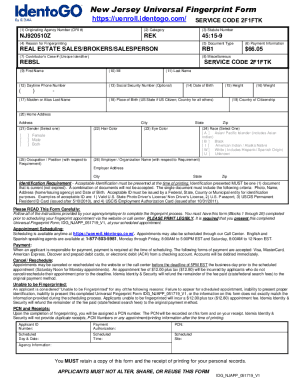
This guide provides step-by-step instructions for filling out the Q: How Do I Obtain My Service Code To Register ... - Identogo form online. By following these instructions, users can successfully complete the form and ensure they have all necessary information ready for their fingerprinting process.
Follow the steps to complete the form accurately.
- Click the ‘Get Form’ button to access the form online.
- Fill in the Originating Agency Number (ORI #) in the appropriate section. This number is essential for identifying the requesting agency.
- Select the appropriate Category from the provided options to indicate the type of service for your fingerprinting.
- Enter the Statute Number NJ920510Z in the specified field.
- State the reason for fingerprinting in the designated section, such as for real estate licensing.
- Indicate the Document Type, for example, ‘RB1’ for real estate.
- Provide payment information, including the fee amount of $66.05.
- Input the Contributor’s Case Number, which acts as a unique identifier.
- Fill in personal information including first name, middle initial, last name, and daytime phone number.
- Optionally include your Social Security Number, if required.
- Complete the Date of Birth, Height, and Weight sections accurately.
- If applicable, provide your Maiden or Alias Last Name.
- Fill in your Place of Birth and Country of Citizenship.
- Enter your Home Address, including street, city, state, and zip code.
- Select your Gender from the choices provided.
- Choose your Hair Color and Eye Color from the options available.
- Indicate your Occupation or Position relevant to the requirement.
- Select your Race based on the available categories.
- Provide your Employer or Organization Name, along with their address.
- Review all entries for accuracy and legibility, as this form must be completed before scheduling an appointment.
- Save your changes and prepare to download or print the completed form for your records.
Complete your form online to obtain your service code and proceed with your fingerprinting application.
To request another copy of an existing fingerprint clearance, you may contact the state to request the document be mailed to you by calling the Pennsylvania Department of Human Services Childline unit at 877-371-5422 and selecting the option to speak with a representative in the fingerprint clearance division.