Loading
Get Au Nat 71162 2014-2026
How it works
-

Open form follow the instructions
-

Easily sign the form with your finger
-

Send filled & signed form or save
How to fill out the AU NAT 71162 online
Filling out the AU NAT 71162 form is a crucial step for users wishing to manage personal injury contributions with their superannuation funds. This guide provides step-by-step instructions to ensure a smooth and efficient completion of the form.
Follow the steps to successfully complete the form.
- Click the ‘Get Form’ button to access the AU NAT 71162 form and open it in the editor.
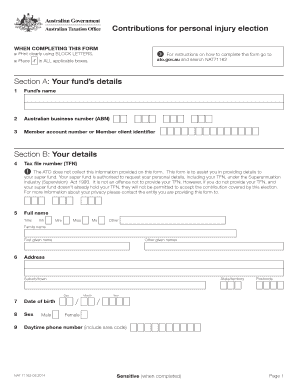
- Section A: Enter your fund’s details which include the fund’s name, Australian business number (ABN), and your member account number or client identifier.
- Section B: Fill in your personal details. Provide your tax file number (TFN), full name (title, family name, first given name, and other given names), address, date of birth, sex, and daytime phone number.
- Section C: If applicable, indicate if you are the legal personal representative for the individual by selecting 'Yes' or 'No'. Complete the representative’s details including full name, address, and daytime phone number.
- Section D: Specify the personal injury payment amount you wish to elect. Ensure to input the amount clearly.
- Section E: Provide the declaration by printing your name in BLOCK LETTERS, signing the form, and entering the date of your declaration. If you are a legal personal representative, complete the additional declaration details as required.
- After reviewing all entries for accuracy, you can save changes, download, print, or share the form as needed.
Complete your AU NAT 71162 form online today to ensure your contributions are accurately managed.