Sheet is used, and information is continued on one additional page for both patents and trademarks, the pages of the cover sheet would be numbered from 1 to 4. Item 1. Name of Conveying Party(ies). Enter the full name of the party(ies) conveying the interest. If there is insufficient space, enter a check mark in the "Yes" box to indicate that additional information is attached. The name of the additional conveying party(ies) should be placed on an attached page clearly identified as a continuati.
Loading

Open form follow the instructions

Easily sign the form with your finger

Send filled & signed form or save
How to fill out the PTO-1595 online
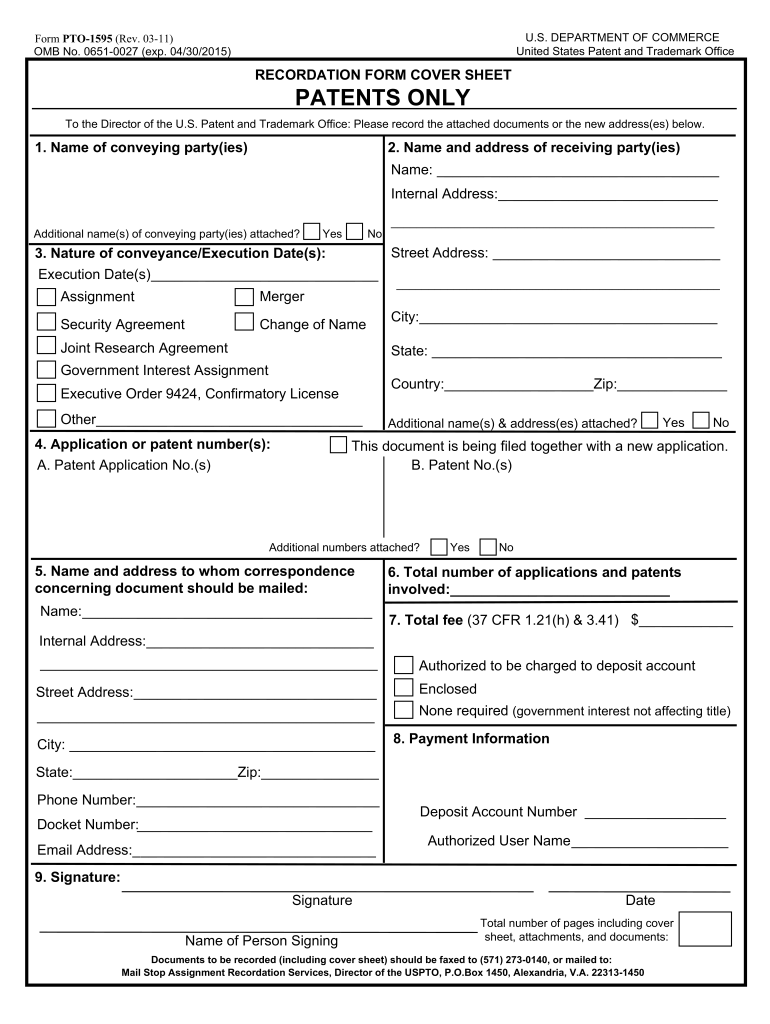
This guide provides clear and supportive instructions on how to fill out the PTO-1595 form effectively. Whether you are familiar with digital documents or new to the process, these step-by-step directions are designed to assist you in submitting your patent assignment requests seamlessly.
Follow the steps to complete the PTO-1595 form online.
- Press the ‘Get Form’ button to access the PTO-1595 form and open it in the online editor.
- In Item 1, enter the full name of the conveying party or parties. If you have additional names, check the 'Yes' box and include the information on an attached page.
- In Item 2, fill in the name and full address of the receiving party or parties. Again, if there are more parties, indicate this by checking the 'Yes' box and providing details on an attached page.
- For Item 3, enter the execution date(s) using the name of the month to avoid any confusion. Select the nature of the conveyance by checking the appropriate box, or specify in the 'Other' field if necessary.
- In Item 4, provide the patent application number(s) or patent number(s). Make sure to indicate if there are additional numbers by checking the 'Yes' or 'No' box as appropriate.
- For Item 5, enter the name and address of the person to whom correspondence about the document should be mailed.
- In Item 6, record the total number of applications and patents involved.
- For Item 7, state the total fee associated with the application or patent. Ensure you refer to the relevant regulations regarding fees.
- In Item 8, provide the payment information, which includes the deposit account number and authorized user name to manage any charges.
- In Item 9, include your signature, the name of the person signing the document, and the date of submission. Lastly, confirm the total number of pages, including any attachments.
- Once all sections are complete, review your entries for accuracy. You can then save your changes, download the completed form, print it, or share it as needed.
Complete the PTO-1595 form online today for efficient processing of your patent assignment.
Experience a faster way to fill out and sign forms on the web. Access the most extensive library of templates available.
Related content
Cover Sheet information must be submitted with each document to be recorded. If the...
by D Code — (PTO-1595). Cover Sheet information must be submitted with each document to...
... 1595. 063BH. 1596. 063CH. Y16.. R. 1597. 063DH. 1598. 063EH. Y17.. R. 1599. 063FH...
Get answers to your most pressing questions about US Legal Forms API.
How to record a patent assignment?
To record a patent assignment, you need to submit a written assignment document to the pertinent patent office, typically including the names of the assignor and assignee. It’s important to ensure all details are accurately conveyed to protect your legal rights. Utilizing PTO-1595 simplifies the recording process by providing all necessary forms. Accessing resources from US Legal Forms can further facilitate a smooth experience.
How to fill out a patent application form?
Filling out a patent application form involves providing detailed information about your invention, including its specifications and claims. Start by reviewing the guidelines offered by PTO-1595 to ensure compliance with legal standards. Tools and resources available on platforms like US Legal Forms can further simplify this process and provide essential templates.
What is a notice of recordation of assignment?
A notice of recordation of assignment is a document that confirms the official recording of a patent or trademark assignment. This notice is crucial as it serves as public evidence of the transfer of rights. When using PTO-1595, you can easily manage this documentation and ensure all necessary information is included to avoid complications.
How to record trademark assignment?
To record a trademark assignment, you must file the proper documentation with the United States Patent and Trademark Office (USPTO). This typically includes an application form and the assignment agreement. PTO-1595 offers insights and forms that make this process smoother. Always ensure your assignment is recorded to protect your rights.
Does a patent assignment need to be recorded?
Yes, recording a patent assignment is crucial for establishing legal ownership. Recording the assignment provides public notice of the transfer, which can prevent future legal conflicts. The PTO-1595 includes instructions on how to effectively record these assignments. Consider using resources from US Legal Forms to guide you through the steps.
Do you need an assignment for a provisional patent application?
When filing a provisional patent application, an assignment is not mandatory. However, if you want to ensure ownership is clear and prevent future disputes, it's wise to document the assignment. PTO-1595 provides the necessary forms to correctly assign rights. Utilizing platforms like US Legal Forms can simplify this process.
How to file a corrective assignment in USPTO?
To file a corrective assignment with the USPTO, prepare the necessary documents that highlight the incorrect information. Submit these documents through the USPTO’s online system or by physical mail. Ensure you reference your PTO-1595 in your submission for clarity. If you need guidance, USLegalForms provides templates and assistance that can help you through your filing.
How to get USPTO filing receipt?
You can obtain your USPTO filing receipt by requesting it directly from the USPTO after your application submission. Look for it in your email, as many applicants receive digital versions automatically. If you need assistance with your PTO-1595 or any related filing, consider using USLegalForms to navigate the process smoothly. They offer resources that can simplify your experience.
How to check USPTO application status?
To check your USPTO application status, visit the USPTO website and navigate to the application status tool. Input your application number to retrieve instant updates. This process is straightforward and involves your order, including PTO-1595, making it easy to track your progress. Stay informed with timely access to your application's journey.
What is a filing receipt?
A filing receipt serves as proof that a submission was made to the USPTO. It outlines important details about your application, facilitating communication throughout the patenting process. This document relates to your PTO-1595, making it essential to safeguard as you move forward. You can refer to it anytime to access your application's specifics.
Use professional pre-built templates to fill in and sign documents online faster. Get access to thousands of forms.
If you believe that this page should be taken down, please follow our DMCA take down process here.
This form is available in several versions. Select the version you need from the drop-down list below.