Loading
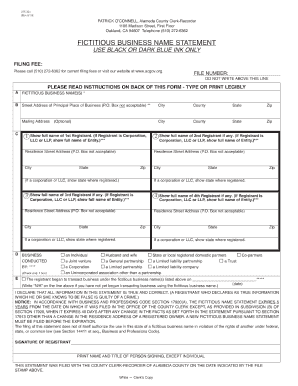
Get Ca Form 275-321 2010
How it works
-

Open form follow the instructions
-

Easily sign the form with your finger
-

Send filled & signed form or save
How to fill out the CA Form 275-321 online
This guide provides users with a clear and supportive approach to completing the CA Form 275-321 online. By following these detailed instructions, you will easily navigate the sections and fields of the form to ensure your information is accurately submitted.
Follow the steps to complete the CA Form 275-321 online.
- Click ‘Get Form’ button to obtain the form and open it in the editor.
- Insert the fictitious business name or names into the designated fields marked with an asterisk. Ensure that only names operated at the same address are listed on the same statement.
- Fill in the street address of the principal place of business. Note that P.O. Box addresses are not acceptable in this section.
- Provide the full names and residence addresses of each registrant. If a registrant is a corporation, limited liability company, or similar entity, include the name and state of organization.
- Specify the nature of the business ownership by checking only one box that accurately describes your scenario, such as individual, partnership, or corporation.
- Indicate the date when business commenced under the fictitious name. If business has not yet started, mark the first box.
- Sign the form in the designated area, ensuring that the person signing is authorized to do so according to the business type.
- Review all entries for accuracy and clarity. Once completed, save changes to the form, and choose to download, print, or share as needed.
Complete your CA Form 275-321 online today for a seamless filing experience.
Get form
Experience a faster way to fill out and sign forms on the web. Access the most extensive library of templates available.
Get This Form Now!
Use professional pre-built templates to fill in and sign documents online faster. Get access to thousands of forms.