Present pension or annuity changes. I understand that my pension or annuity may affect my Social Security benefits and that failure to report such pension or annuity may result in an overpayment which I may have to pay back. I know that anyone who makes or causes to be made a false statement or representation of material fact in an application or for use in determining a right to payment under the Social Security Act commits a crime punishable under Federal law by fine, imprisonment or both. I a.
Loading

Open form follow the instructions

Easily sign the form with your finger

Send filled & signed form or save
How to fill out the SSA-3885 online
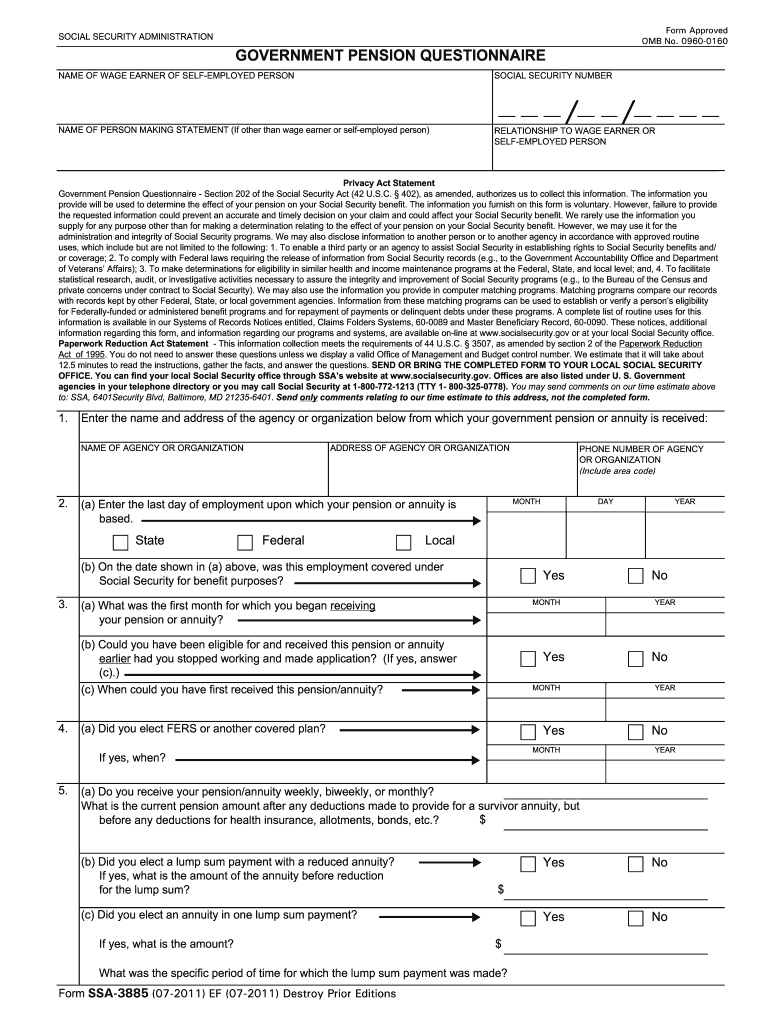
Filling out the SSA-3885 form, also known as the government pension questionnaire, is a crucial step for individuals seeking clarification on how their pension affects their Social Security benefits. This guide will provide you with clear and concise instructions on how to complete the form online, ensuring your submission is accurate and timely.
Follow the steps to accurately fill out the SSA-3885 online.
- Click ‘Get Form’ button to obtain the form and open it for editing.
- Begin by entering the name and address of the agency or organization from which your government pension or annuity is received. This information is essential for identifying the source of your pension.
- Provide your Social Security number in the designated field. This number is crucial for processing your form and connecting it to your benefits.
- Fill in your name and the relationship to the wage earner or self-employed person if you are not the individual receiving the pension.
- Indicate the last day of employment that your pension is based on and specify whether this was state, federal, or local employment. Choose the appropriate month and year from the dropdown menus.
- Answer questions about your pension or annuity payments, including whether you received this pension earlier if you had stopped working and applied sooner.
- Complete the sections regarding the amounts of your pension, indicating if you receive payments weekly, biweekly, or monthly. Provide the current amount and whether you elected a lump sum payment.
- Check if your pension amount has changed for the months you are applying for and provide the former amounts and dates of any changes.
- If applicable, answer questions regarding support received from a spouse at the time they became entitled to retirement or disability benefits.
- Review the important information section carefully. By signing, you agree to report any changes in your pension to the Social Security Administration.
- Sign the document using ink, providing your first name, middle initial, and last name. Include your signature date.
- Provide a contact telephone number, your mailing address, city, state, and zip code.
- If the form is signed by mark (X), remember to include signatures and addresses of two witnesses.
- Once all sections are completed, save your changes, then download, print, or share the form as needed.
Start filling out the SSA-3885 online today to ensure your Social Security benefits are accurately assessed.
Experience a faster way to fill out and sign forms on the web. Access the most extensive library of templates available.
Related content
Form SSA-3885 (07-2011) EF (07-2011) Destroy Prior Editions. SOCIAL SECURITY...
Use professional pre-built templates to fill in and sign documents online faster. Get access to thousands of forms.
If you believe that this page should be taken down, please follow our DMCA take down process here.
This form is available in several versions. Select the version you need from the drop-down list below.