Loading
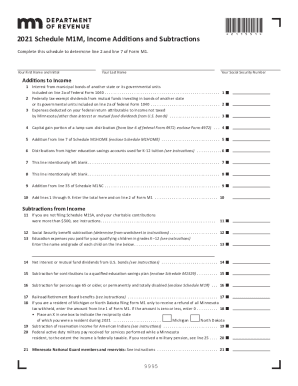
Get Mn Dor Schedule M1m 2021-2026
How it works
-

Open form follow the instructions
-

Easily sign the form with your finger
-

Send filled & signed form or save
How to fill out the MN DoR Schedule M1M online
Navigating tax forms can be challenging, but with clear guidance, you can complete the MN Department of Revenue Schedule M1M efficiently. This guide will walk you through each section of the form to ensure you provide the necessary information correctly.
Follow the steps to fill out the MN DoR Schedule M1M accurately.
- Click 'Get Form' button to obtain the form and open it in the editor.
- Enter your first name and initial in the designated field.
- Input your last name in the appropriate section.
- Provide your Social Security number in the designated field.
- For the Additions to Income section, fill in the amounts for each line (1 to 10) as applicable, ensuring accurate figures that correspond with previous documentation.
- In the Subtractions from Income section, carefully complete lines (11 to 32) based on your qualifying expenses and deductions.
- Review all entered information for accuracy and completeness to ensure nothing is omitted or incorrect.
- Once you have completed the form, save your changes, then download or print the form as needed for submission.
- If applicable, share the completed form with your tax advisor or other relevant parties.
Start filling out the MN DoR Schedule M1M online today for a smoother tax filing experience.
Related links form
Use Schedule M1W to report your wages and income tax withheld. Only report your Minnesota income tax withheld. Do not report federal income tax withheld, Social Security tax withheld, or another state's tax withheld. Nonresident Partners or Shareholders may have Minnesota tax withheld on Schedule KPI or Schedule KS.