Loading
Get Nc Dor D-400tc 2020-2026
How it works
-

Open form follow the instructions
-

Easily sign the form with your finger
-

Send filled & signed form or save
How to fill out the NC DoR D-400TC online
Filling out the NC DoR D-400TC form is an essential step for claiming specific tax credits. This guide will provide you with clear, step-by-step instructions on completing this form accurately, ensuring you can manage your online submission with confidence.
Follow the steps to complete the NC DoR D-400TC efficiently.
- Press the ‘Get Form’ button to access the form and open it for editing.
- Enter your Social Security Number in the designated field. This information is necessary for identification purposes.
- Fill in your last name (up to the first 10 characters) in the appropriate box.
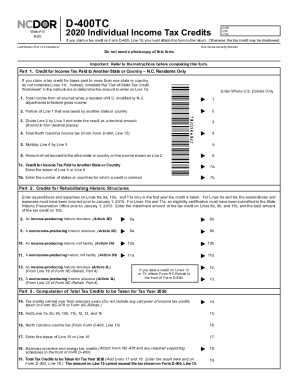
- In Part 1, provide your total income from all sources while residing in North Carolina modified by N.C. adjustments on Line 1.
- Next, indicate on Line 2 the portion of your total income that was taxed by another state or country.
- For Line 3, divide the amount on Line 2 by the amount on Line 1 and record the resulting decimal rounded to four decimal places.
- Fill in Line 4 with your total North Carolina income tax from Form D-400, Line 15.
- Calculate on Line 5 by multiplying the figure on Line 4 by the decimal from Line 3.
- Record the amount of net tax you paid to the other state or country on Line 6.
- On Line 7a, enter the lesser amount between Line 5 and Line 6. Then, specify the number of states or countries for which you are claiming a credit on Line 7b.
- Proceed to Part 2 for credits related to rehabilitating historic structures, filling out Lines 8a, 9a, 10a, and 11a with the relevant expenses incurred prior to January 1, 2015.
- For Lines 8b, 9b, and 11b, enter the installment amounts of the tax credit, while Line 10b should show the total tax credit amount.
- In Part 3, indicate any tax credits carried over from previous years on Line 14.
- Add the amounts from Lines 7a, 8b, 9b, 10b, 11b, 12, 13, and 14 and enter the total on Line 15.
- Record the North Carolina income tax amount from Form D-400, Line 15 on Line 16.
- Enter the lesser amount between Line 15 or Line 16 on Line 17.
- Include business incentive and energy tax credits on Line 18. Remember to attach any required supporting forms.
- Finally, add the amounts from Lines 17 and 18 for the total tax credits to be taken for the tax year 2020 on Line 19 and ensure it is entered on Form D-400, Line 16.
- Once you have filled out all required information, you can save your changes, download the completed form, print it, or share it as needed.
Start completing your NC DoR D-400TC form online today to ensure you claim your eligible tax credits!
Earned Income Tax Credit (Refundable) If you are eligible for the federal earned income tax credit, complete Part 5 of Form D-400TC to determine your State credit. A part-year resident or nonresident may claim a prorated credit based on the percentage of income that is subject to North Carolina tax.