Loading
Get Nwcg General Message
How it works
-

Open form follow the instructions
-

Easily sign the form with your finger
-

Send filled & signed form or save
How to fill out the Nwcg General Message online
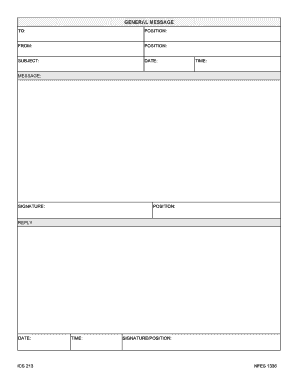
The Nwcg General Message form is a key document used for communication within incident management. This guide will provide you with a clear, step-by-step process to ensure you fill out this form correctly and efficiently.
Follow the steps to successfully complete the Nwcg General Message form online.
- Click ‘Get Form’ button to obtain the form and open it in the editor.
- Begin by filling in the 'TO' field with the name or title of the individual or entity receiving the message.
- In the 'POSITION' field, enter the official title of the recipient for clarity.
- Next, provide your information in the 'FROM' field, including your name and relevant details.
- Fill out the 'POSITION' field under 'FROM' with your official title.
- In the 'SUBJECT' section, briefly summarize the main topic or purpose of the message.
- Record the current 'DATE' in the designated area to timestamp your message accurately.
- Indicate the 'TIME' of the message to specify when it was drafted.
- Compose your message in the 'MESSAGE' field, ensuring clarity and professionalism.
- Sign off by entering your 'SIGNATURE' and providing your 'POSITION' to authenticate the document.
- Should you need to reply to this message, fill in the 'REPLY' section with the forwarded message content.
- Again, record the 'DATE' and 'TIME' for the reply to maintain a clear timeline.
- Finally, sign the reply with your 'SIGNATURE' and 'POSITION' to confirm your response.
- After completing the form, you can save your changes, download, print, or share the document as needed.
Complete your Nwcg General Message form online today for streamlined communication.
The plan is a summary of information. Information from the Incident Communications Plan on frequency assignments can be placed on the appropriate Assignment form (ICS Form 204)....Tentative Release List. ICS Form #Form TitlePrepared ByICS-204AAssignment List AttachmentsOperations & Planning Sections Staff32 more rows