Loading
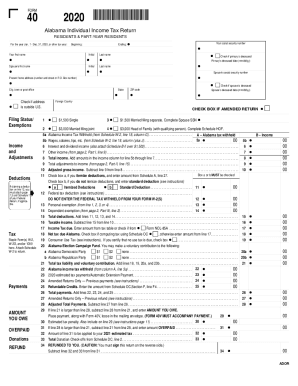
Get 6 Check If Primary Is Deceased
How it works
-

Open form follow the instructions
-

Easily sign the form with your finger
-

Send filled & signed form or save
How to fill out the 6 Check If Primary Is Deceased online
Filling out the 6 Check If Primary Is Deceased form is an essential process when managing tax matters for individuals who have passed away. This guide will provide you with clear, step-by-step instructions to help you complete the form accurately and efficiently.
Follow the steps to complete the 6 Check If Primary Is Deceased form.
- Begin by clicking the ‘Get Form’ button to access the form. This will allow you to open the document in the necessary editing tool.
- Fill in your first name, initial, and last name in the designated fields. Ensure that the names provided match the official documents for consistency.
- Enter your social security number where prompted. It is critical to input this correctly to avoid any processing issues.
- Indicate the deceased date of the primary individual in the specified field (mm/dd/yy format). Make sure the date reflects the actual date of death.
- If applicable, provide your spouse’s name and social security number in the appropriate sections. Including this information is important for accurate record-keeping.
- Fill out the present home address with correct details including the street address, city, state, and ZIP code. Verify that the address is up to date.
- Check the box for 'Check if primary is deceased' to confirm the status of the individual.
- Complete the section for income and adjustments, including any deductions, taxes withheld, and total payments as relevant.
- After reviewing all information for accuracy, you can proceed to save your changes. Options typically include downloading, printing, or sharing the document as needed.
Take the next step and fill out your documents online to ensure efficient processing of your tax matters.
Get form
Experience a faster way to fill out and sign forms on the web. Access the most extensive library of templates available.
Get This Form Now!
Use professional pre-built templates to fill in and sign documents online faster. Get access to thousands of forms.