Loading
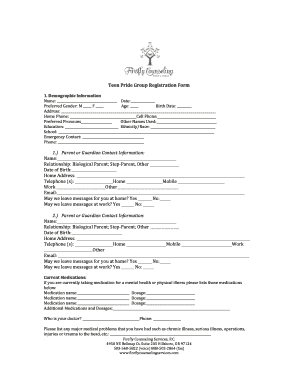
Get Pride Group Registration
How it works
-

Open form follow the instructions
-

Easily sign the form with your finger
-

Send filled & signed form or save
How to fill out the Pride Group Registration online
This guide will provide you with step-by-step instructions on how to complete the Pride Group Registration form online. By following these steps, you can ensure that all necessary information is accurately submitted for registration.
Follow the steps to complete your registration effectively.
- Press the ‘Get Form’ button to access the Pride Group Registration form and open it for editing.
- Begin by filling out the demographic information section. Enter your name, the date, preferred gender, age, and birth date. Make sure to include your complete address and both home and cell phone numbers. Additionally, indicate your preferred pronouns and any other names you may use.
- Next, provide details about your education and ethnicity or race. Include the name of your school as well.
- Fill in the emergency contact section by entering the contact's name and phone number. This information will be critical in case of an emergency.
- Move on to the first parent or guardian contact information. Enter their name, relationship to you, date of birth, and full address. Include telephone numbers for home, mobile, and work, as well as their email address.
- Repeat the previous step for the second parent or guardian contact information, ensuring you provide the same level of detail.
- Document any current medications you are taking for mental health or physical issues. For each medication, write down the name and dosage.
- Identify your healthcare provider by providing their name and phone number.
- List any major medical problems you have faced, including chronic illnesses or significant injuries.
- Address any mental health-related concerns or previously diagnosed conditions in the designated area.
- Indicate if you have any allergies and describe them if applicable.
- Use the space provided to ask any questions you may have for your therapist or group facilitator.
- Review the policies on mental health practices and confidentiality provided by Firefly Counseling Services. Once you have read and understood them, sign the form to authorize mental health counseling or group support. Include the date of your signature.
- After completing all sections, you can save your changes, download a copy of the filled form, print it out, or share it as needed.
Take the next step in your journey by completing your Pride Group Registration form online today.
The multicultural festival takes place on 5th Avenue between 1st and 9th Streets.
Industry-leading security and compliance
US Legal Forms protects your data by complying with industry-specific security standards.
-
In businnes since 199725+ years providing professional legal documents.
-
Accredited businessGuarantees that a business meets BBB accreditation standards in the US and Canada.
-
Secured by BraintreeValidated Level 1 PCI DSS compliant payment gateway that accepts most major credit and debit card brands from across the globe.