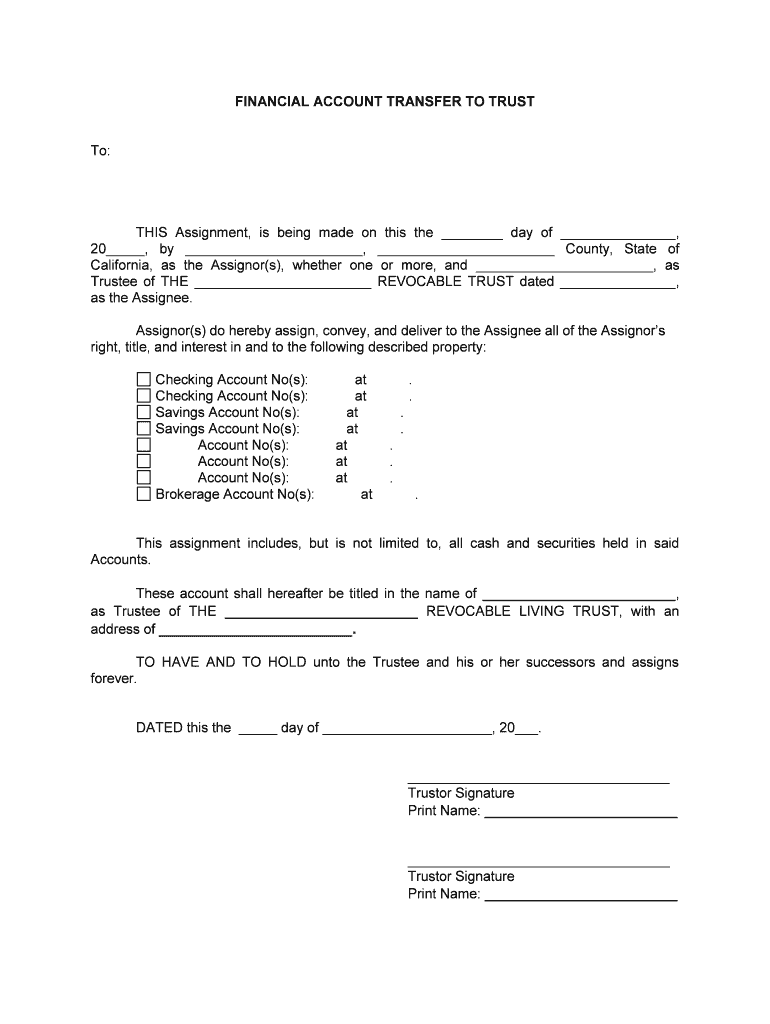
FINANCIAL ACCOUNT TRANSFER TO TRUSTTo:THIS Assignment, is being made on this the day of , 20 , by , County, State of California, as the Assignor(s), whether one or more, and , as Trustee of THE REVOCABLE.

Open form follow the instructions

Easily sign the form with your finger

Send filled & signed form or save
How to fill out the California Trust online
Filling out the California Trust is a crucial step in managing financial assets and ensuring smooth transitions in asset ownership. This guide will provide clear instructions on how to complete the California Trust online, keeping you informed and confident throughout the process.
Follow the steps to complete the California Trust online effectively.
- Click the ‘Get Form’ button to obtain the form and open it in your preferred editor.
- Enter the date at the top of the form, indicating the day, month, and year for the assignment.
- Fill in the names of the assignor(s), ensuring to include their full names and the county and state of residence.
- Specify the name of the trustee and the title of the trust. Ensure accuracy to avoid any future complications.
- List all financial accounts being transferred to the trust. Include checking, savings, and brokerage account numbers, along with the financial institution where each account is held.
- Provide the name of the trust and the address where the trustee can be reached.
- Sign the document under the 'Trustor Signature' section. Ensure that all trustees or assignors sign where indicated.
- Complete the notary section by providing the name and title of the notary public. This step involves having the document acknowledged before a notary.
- Review the completed document for any missing information or errors before finalizing.
- Once all sections are complete, save your changes, and consider downloading, printing, or sharing the completed form as needed.
Start filling out your California Trust online today to ensure your financial future is secure.
Experience a faster way to fill out and sign forms on the web. Access the most extensive library of templates available.
Related content
CREATION, VALIDITY, MODIFICATION, AND TERMINATION OF TRUSTS. 15200-15414 ... Allocation of...
Oct 27, 2018 — California Probate Code Section 18100.5(h) provides that a person making...
California Bank & Trust (CB&T) is a full-service bank specializing in business banking and...
Get answers to your most pressing questions about US Legal Forms API.
What makes a trust valid in California?
California law states that a trust is created only if: The settlor properly manifests an intention to create a trust; There is trust property; and. There is a beneficiary (unless it is a charitable trust).
What is a California trust?
More Californians than ever are using trusts in their estate plans. A trust is a legal entity created by the trustor. The trustor transfers his or her assets and property into the trust and appoints trustees to manage the trust for the benefit of the beneficiaries.
Can I write my own trust in California?
To make your trust valid in California, you simply need to sign the trust document — that's it! You don't need to have your document witnessed or notarized to make it valid. However, many people choose to sign their document in the presence of a notary public to help authenticate the document.
What are the disadvantages of a trust in California?
Generally, trusts have higher preparation costs than other estate planning tools. They require the individual to retitle their assets in the name of the trust. This can take both time and money. If a person fails to retitle their assets, they will not pass through the trust and they will instead go through probate.
Is a handwritten living trust legal in California?
Holographic wills, also called handwritten wills, are accepted in California. To be valid, a holographic will must: Be written entirely in your handwriting and signed by you. Be written while you were of sound mind, and not under pressure from someone else.
Do you need an attorney for a trust in California?
Important: The California Attorney General does not give legal advice to individuals. If you are trying to decide how to provide for the distribution of your assets or care of your children after you die and you need legal assistance, you should hire your own lawyer.
What is the cost of creating a trust in California?
If you do it yourself by buying a book or an online guide, it will likely cost less than $100. However, there are pitfalls to DIY estate planning. The downside of working with a professional, however, is the cost. If you choose to use an attorney to help you draft your trust documents, it could cost more than $1,000.
What are the 3 types of trust?
To help you get started on understanding the options available, here's an overview the three primary classes of trusts. Revocable Trusts. Irrevocable Trusts. Testamentary Trusts.
Use professional pre-built templates to fill in and sign documents online faster. Get access to thousands of forms.
If you believe that this page should be taken down, please follow our DMCA take down process here.