Loading
Form preview
  • US Legal Forms
  • Form Library
  • More Forms
  • More Multi-State Forms
  • Sap Authorization Letter

Get Sap Authorization Letter

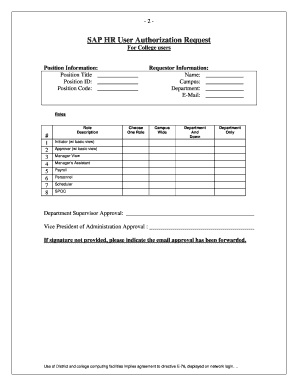
By the department supervisor and Vice President of Administration. The completed form should be submitted to the SPOC either via email or hard copy. If the form is issued via email, the requestor may attach or forward email approvals from the department supervisor and Vice President of Administration with the form. The campus SPOC is required to approve or deny the request. Approved requests should be forwarded to operag email.laccd.edu Authorizations administrators at the District Office will.

How it works

  1. Open form

    Open form follow the instructions

  2. Easily sign form

    Easily sign the form with your finger

  3. Share form

    Send filled & signed form or save

How to fill out the Sap Authorization Letter online

Filling out the Sap Authorization Letter is a crucial step in managing user access to college computing resources. This guide provides clear, step-by-step instructions to assist you in completing this form accurately and efficiently online.

Follow the steps to complete your Sap Authorization Letter

  1. Click ‘Get Form’ button to obtain the form and open it in the editor.
  2. Begin by entering the position information. Fill in the fields for position title, position ID, and position code.
  3. Next, complete the requestor information section. Input your name, campus, department, and email address.
  4. In the roles section, choose the role that best fits your requirements from the provided options, such as initiator, approver, manager's assistant, or payroll.
  5. Obtain approval from your department supervisor and the Vice President of Administration. If signatures are not available, ensure email approvals are attached or forwarded.
  6. Once completed, submit the form to your campus SPOC either via email or as a hard copy. Include any necessary approvals obtained via email.
  7. After submission, the campus SPOC will review your request and will approve or deny it. You will receive written feedback on the status of your request.
  8. If approved, forward the completed form to operag@email.laccd.edu for further processing. Should your request be denied, you may appeal the decision through your SPOC.
  9. Finally, ensure you save changes, download, print, or share the form as needed for your records.

Complete your Sap Authorization Letter online today!

Get form

Experience a faster way to fill out and sign forms on the web. Access the most extensive library of templates available.
Get form

Related content

Get Authorized: Agency Authorization | .gov
This page describes the steps and deliverables needed to complete the agency authorization...
Learn more
SAP User Authorization Request
SAP User Authorization Request. For College users. Instructions: User needs to complete...
Learn more
The Standard Application Procedure for the...
Mar 12, 2018 — This Standard Application Procedure (SAP) correlates with version 8 of...
Learn more

Related links form

Philippine Airlines TARF 2013 Philippine Airlines TARF 2007 Philippine FPIP ID Application 1 2012 PNUAT Application for Admission Test

Questions & Answers

Get answers to your most pressing questions about US Legal Forms API.

Contact support

Ensure that the security roles are appropriately assigned to users and tested thoroughly before deployment. Evaluate business risks associated with security role design, implement appropriate controls to address those risks and provide recommendations on ways to simplify and streamline the security design.

Use transaction SU56 to display all of your own authorizations or the authorizations of another user. Call transaction SU56 by choosing Goto → Entered Authorization in User Buffer. This transaction shows which authorizations are currently assigned in the user's user master record.

Steps to create authorization field Go to transaction code SU20. Click the create new button on the application toolbar. Enter “ZTCODE” in the Field Name and “TCODE” in the Data Element, then hit Enter. Click the save button on the system toolbar.

Authorization check helps to restrict the users to access some transaction code/perform some task on SAP.

Assigning Authorizations to Users Open the SAP Easy Access menu and choose Business Explorer Manage Analysis Authorizations . Select the User tab and under Analysis Authorizations Assignment . Select a user and choose Edit. You have two options: ... Save your entries.

An authorization enables you to use certain functions in the SAP System. Every authorization relates to an authorization object and defines a value or values for each authorization field contained in the authorization object. Authorizations are grouped into profiles that are entered in the user master record.

A SAP_ALL authorization profile allows the user to perform all the tasks in a SAP system. This is the composite profile that contains all the authorization in a SAP system. The users with this authorization can perform all the activities in a SAP system, so this profile shouldn't be assigned to any user in your system.

Get This Form Now!

Use professional pre-built templates to fill in and sign documents online faster. Get access to thousands of forms.
Get form
If you believe that this page should be taken down, please follow our DMCA take down processhere.

Industry-leading security and compliance

US Legal Forms protects your data by complying with industry-specific security standards.
  • In businnes since 1997
    25+ years providing professional legal documents.
  • Accredited business
    Guarantees that a business meets BBB accreditation standards in the US and Canada.
  • Secured by Braintree
    Validated Level 1 PCI DSS compliant payment gateway that accepts most major credit and debit card brands from across the globe.
Get Sap Authorization Letter
Get form
  • Adoption
  • Bankruptcy
  • Contractors
  • Divorce
  • Home Sales
  • Employment
  • Identity Theft
  • Incorporation
  • Landlord Tenant
  • Living Trust
  • Name Change
  • Personal Planning
  • Small Business
  • Wills & Estates
  • Packages A-Z
  • Affidavits
  • Bankruptcy
  • Bill of Sale
  • Corporate - LLC
  • Divorce
  • Employment
  • Identity Theft
  • Internet Technology
  • Landlord Tenant
  • Living Wills
  • Name Change
  • Power of Attorney
  • Real Estate
  • Small Estates
  • Wills
  • All Forms
  • Forms A-Z
  • Form Library
  • Legal Hub
  • About Us
  • Help Portal
  • Legal Resources
  • Blog
  • Affiliates
  • Contact Us
  • Delete My Account
  • Site Map
  • Industries
  • Forms in Spanish
  • Localized Forms
  • State-specific Forms
  • Forms Kit
  • Real Estate Handbook
  • All Guides
  • Notarize
  • Incorporation services
  • For Consumers
  • For Small Business
  • For Attorneys
  • USLegal
  • FormsPass
  • pdfFiller
  • signNow
  • altaFlow
  • DocHub
  • Instapage
Form Packages
  • Adoption
  • Bankruptcy
  • Contractors
  • Divorce
  • Home Sales
  • Employment
  • Identity Theft
  • Incorporation
  • Landlord Tenant
  • Living Trust
  • Name Change
  • Personal Planning
  • Small Business
  • Wills & Estates
  • Packages A-Z
Form Categories
  • Affidavits
  • Bankruptcy
  • Bill of Sale
  • Corporate - LLC
  • Divorce
  • Employment
  • Identity Theft
  • Internet Technology
  • Landlord Tenant
  • Living Wills
  • Name Change
  • Power of Attorney
  • Real Estate
  • Small Estates
  • Wills
  • All Forms
  • Forms A-Z
  • Form Library
Customer Service
  • Legal Hub
  • About Us
  • Help Portal
  • Legal Resources
  • Blog
  • Affiliates
  • Contact Us
  • Delete My Account
  • Site Map
  • Industries
  • Forms in Spanish
  • Localized Forms
  • State-specific Forms
  • Forms Kit
Legal Guides
  • Real Estate Handbook
  • All Guides
Prepared for you
  • Notarize
  • Incorporation services
Our Customers
  • For Consumers
  • For Small Business
  • For Attorneys
Our Sites
  • USLegal
  • FormsPass
  • pdfFiller
  • signNow
  • altaFlow
  • DocHub
  • Instapage
Social Media
Call us now toll free:
+1 833 426 79 33
As seen in:
© Copyright 1999-2026 airSlate Legal Forms, Inc. 3720 Flowood Dr, Flowood, Mississippi 39232
  • Your Privacy Choices
  • Terms of Service
  • Privacy Notice
  • Content Takedown Policy
  • Bug Bounty Program