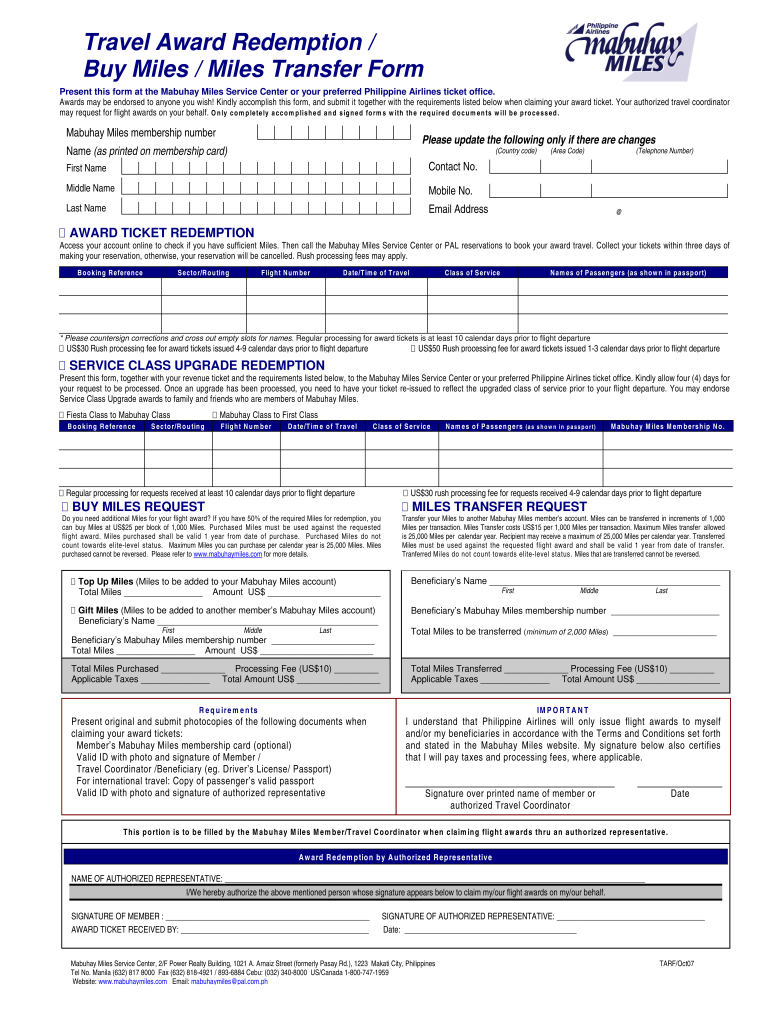
you wish! Kindly accomplish this form, and submit it together with the requirements listed below when claiming your award ticket. Your authorized travel coordinator may request for flight awards on your behalf. Only completely accomplished and signed forms with the required documents will be processed. Mabuhay Miles membership number Please update the following only if there are changes Name (as printed on membership card) (Country code) First Name Middle Name Email Address (Telephone Nu.
Loading

Open form follow the instructions

Easily sign the form with your finger

Send filled & signed form or save
How to fill out the Philippine Airlines TARF online
This guide provides clear, step-by-step instructions on how to complete the Philippine Airlines Travel Award Redemption Form (TARF) online. It aims to assist users in efficiently filling out the form to ensure a smooth processing of their travel awards.
Follow the steps to successfully fill out the TARF online.
- Click ‘Get Form’ button to obtain the form and open it in the editor.
- Fill in your Mabuhay Miles membership number in the designated field. Update your details only if there have been changes to your personal information, including your name, email address, and contact number.
- For the award ticket redemption, ensure you have sufficient miles by accessing your account online. Note the booking reference and the full details of your intended flight, such as sector/routing, flight number, and date/time of travel. Include names of passengers as they appear in their passports.
- If you are requesting a service class upgrade, complete this section with the necessary details, including the booking reference and flight details, ensuring you allow at least four days for processing.
- If you need to buy miles, indicate the number of miles you wish to purchase. Remember that you can buy miles in increments of 1,000 for a fee. Enter the requisite information about the passengers who will benefit from the additional miles.
- For miles transfer requests, provide the details of the beneficiary including their Mabuhay Miles membership number and the total miles to be transferred.
- Review the requirements section and make sure to prepare and submit the necessary documents along with the completed form.
- Once all sections are completed and reviewed, save your changes, and you may opt to download, print, or share the form as needed.
Complete your documents online to efficiently process your travel awards today.
Experience a faster way to fill out and sign forms on the web. Access the most extensive library of templates available.
Related content
(Switzerland Airlines) stated that in their decision to purchase aircraft, if all things...
This is the Delta Worldwide Timetable from April 2, 2000, created by Delta Air Lines, Inc...
Sep 18, 2025 — Gulf means a bay of the sea .[9] The name of the area where the war took...
Get answers to your most pressing questions about US Legal Forms API.
How to know if travel tax is included in the ticket Philippines?
To determine if travel tax is included in your ticket, carefully check your booking confirmation from Philippine Airlines TARF. The details regarding taxes should be outlined in the breakdown of your fare. If you are unsure, don’t hesitate to contact Philippine Airlines customer service for clarification. This ensures you budget adequately for your trip.
How many kilos of baggage are allowed in Philippine Airlines?
Philippine Airlines TARF allows passengers to check in a maximum weight of 20 to 30 kilos for economy class, depending on the specific flight. For business class, the allowance can reach up to 40 kilos. Make sure to verify your ticket details, as allowance may vary based on your fare type and route. Always check the latest baggage policies on the Philippine Airlines website for updates.
Can I claim miles from past flights?
Yes, you can claim miles from past flights with Philippine Airlines, provided you have the appropriate documentation. Fill out the missing miles claim form on the website, and include your flight details. This allows you to benefit from the Philippine Airlines TARF system even after your trip.
How do I claim missing miles on Philippine Airlines?
To claim missing miles, visit the Philippine Airlines website and navigate to the appropriate section for missing mile claims. Fill out the necessary form, providing your flight and ticket details. This ensures that your miles get credited efficiently, aligning with the Philippine Airlines TARF process.
How to get elite Philippine Airlines?
To achieve elite status with Philippine Airlines, you must earn a specific number of qualifying miles or segments within a calendar year. This elevated tier offers additional benefits, enhancing your travel experience with Philippine Airlines TARF perks. Keep track of your travel to reach elite status faster.
How do I claim missing miles on PAL?
If you notice missing miles on your Philippine Airlines account, you can submit a claim through the website. Provide the necessary details about the flights taken and include your ticket information. This ensures that your miles will be credited accurately, especially in relation to the Philippine Airlines TARF.
How to book flights using Mabuhay Miles?
Booking flights with Mabuhay Miles involves logging into your account on the Philippine Airlines website. Select the option to redeem miles when searching for flights. This feature allows you to use your accumulated miles for tickets, making your travel more affordable through the Philippine Airlines TARF.
How do I file a claim with Philippine Airlines?
Filing a claim with Philippine Airlines is straightforward. You can do this online through the Philippine Airlines website by filling out the appropriate claim form. Make sure to provide all relevant details, such as your booking reference and flight information, to expedite your claim related to the Philippine Airlines TARF.
How to retrieve the Mabuhay miles?
To retrieve your Mabuhay miles, visit the Philippine Airlines website and log into your Mabuhay Miles account. Once logged in, you can view your miles balance, transaction history, and other account details. This process ensures you stay updated on how many miles you have earned through the Philippine Airlines TARF.
Is travel tax included in Philippine Airlines tickets?
In general, Philippine Airlines tickets include travel tax in the final fare. This tax applies to both domestic and international flights departing from the Philippines. Always verify your ticket details to understand the comprehensive costs. If you have questions or need legal information regarding travel taxes, U.S. Legal Forms can be a valuable resource.
Use professional pre-built templates to fill in and sign documents online faster. Get access to thousands of forms.
If you believe that this page should be taken down, please follow our DMCA take down process here.