Loading
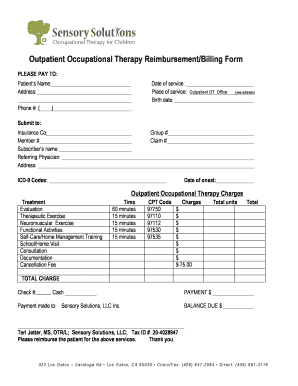
Get Outpatient Occupational Therapy Reimbursement/billing Form
How it works
-

Open form follow the instructions
-

Easily sign the form with your finger
-

Send filled & signed form or save
How to fill out the Outpatient Occupational Therapy Reimbursement/Billing Form online
Filling out the Outpatient Occupational Therapy Reimbursement/Billing Form can seem daunting, but this guide will help simplify the process for you. Follow the step-by-step instructions to accurately complete the form online, ensuring all necessary information is provided for prompt reimbursement.
Follow the steps to complete the form with ease.
- Press the ‘Get Form’ button to access the reimbursement form and open it in the designated editor.
- Enter the patient’s name in the designated field. Ensure the name is spelled correctly to prevent discrepancies.
- Fill in the patient's address and phone number, including the area code in the phone field to guarantee accurate contact information.
- Indicate the date of service in the appropriate section, ensuring that it corresponds to the day occupational therapy was provided.
- Select the place of service as ‘Outpatient OT Office’ as instructed on the form.
- Input the birth date of the patient in the specified field to verify their identity.
- Directly beneath this, fill in the name of the insurance company, along with the member number and subscriber's name.
- Complete the referring physician's name and address, crucial for any needed verification or follow-up.
- Provide the group number and claim number as required by the insurance provider.
- List the relevant ICD-9 codes that correspond to the patient's diagnosis for the services being billed.
- Document the date of onset for the condition being treated; this is critical for insurance processing.
- Detail the outpatient occupational therapy charges by filling in each treatment type and its respective costs.
- Indicate the total units for each service rendered, and ensure to calculate the total of all charges accurately.
- Finalize the total charge by summing up all individual service charges to provide a comprehensive total amount due.
- Choose the payment method by checking the appropriate box for check or cash, and specify the amount paid.
- Lastly, fill in the payment made to section with 'Sensory Solutions, LLC Inc.' to confirm where the reimbursement should be directed.
- Calculate and enter the balance due to ensure that all parties are clear on any outstanding payments.
- Once all necessary fields are completed, save any changes made, and proceed to download, print, or share the form as needed.
Complete your outpatient occupational therapy reimbursement form online today for efficient processing!
CPT codes 97530 and 97535 form an NCCI edit pair. Since they were provided as separate and distinct services, they can both be billed—but one service line will require a 59 modifier.