Urance). Private Long Term Care Number Railroad Retirement (Specify number.) Other insurance. No medical insurance at this time. 14. Responsible Party Contact if Not "Member" (Optional) Adult Child Power of Attorney Ex-spouse Sibling Guardian of Person Spouse Parent / Stepparent Other Informal Caregiver / Support 15. Name — Responsible Party (First, Middle Initial, Last) (Optional) 16. Telephone Number(s) — Responsible.
Loading

Open form follow the instructions

Easily sign the form with your finger

Send filled & signed form or save
How to fill out the WI F-11133 online
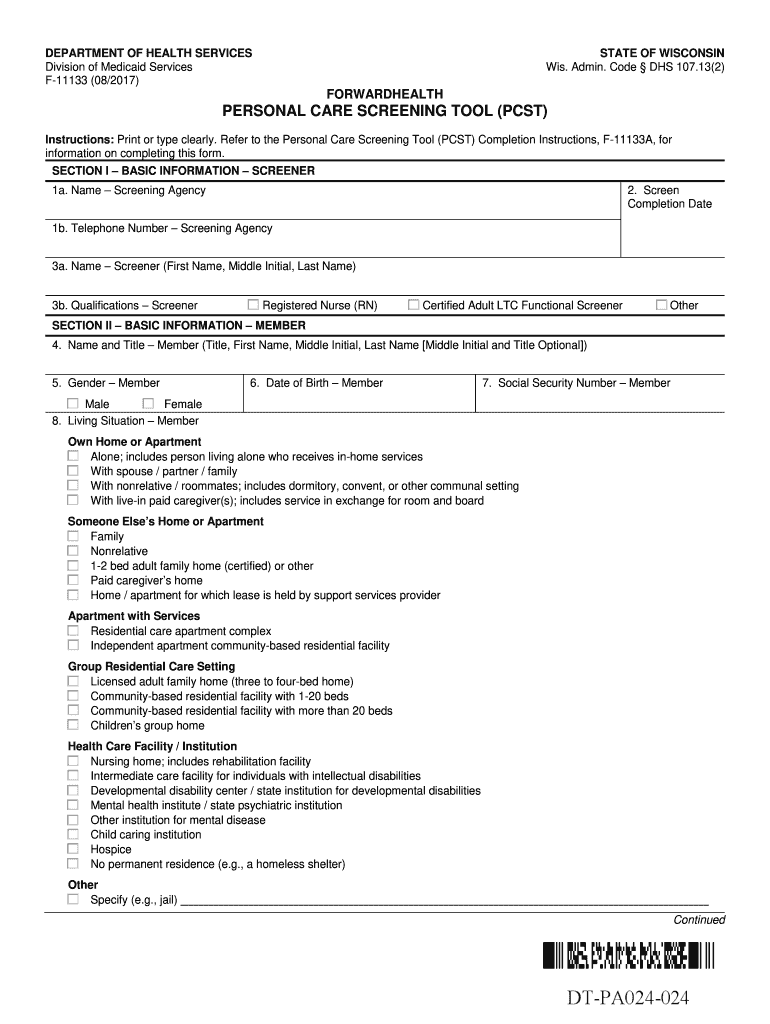
The WI F-11133 form, also known as the Personal Care Screening Tool, is essential for assessing personal care needs. This guide will provide you with clear instructions on how to complete this form online, ensuring accuracy and efficiency in the process.
Follow the steps to complete the WI F-11133 online accurately.
- Press the ‘Get Form’ button to access the form and open it in the document editor.
- Begin with Section I, Basic Information — Screener. Enter the name of the screening agency, the screen completion date, and the screener's telephone number. Complete the screener's name and qualifications.
- Move to Section II, Basic Information — Member. Provide the member's name, gender, date of birth, social security number, and living situation. Make sure to specify the living situation from the provided options.
- Input the member's address and telephone number in Section II. Also, include the county or tribe of residence and responsibility, if applicable.
- In Section III, Insurance and Contact Information — Member, indicate the member's medical insurance. Check all applicable options and provide identification numbers where necessary.
- Complete Section IV, Activities of Daily Living, by assessing the member's capabilities in specific daily tasks such as bathing, dressing, and grooming. Choose the responses that best reflect the member's needs.
- Continue through Sections V and VI, focusing on medically oriented tasks and other considerations. Answer questions regarding medication assistance and behaviors that may affect care.
- Finalize your form in Section VII by entering the billing provider's details and confirming the information's accuracy.
- In Section VIII, the authorized screener must provide their signature and the date signed to confirm that all information is accurate.
Complete the WI F-11133 form online today to ensure proper assessment and care for personal needs.
Experience a faster way to fill out and sign forms on the web. Access the most extensive library of templates available.
Related content
F-11133, Personal Care Screening Tool (PCST), 11/20/2024, Word, English, No. F-11133...
The Secretary shall, upon written request from the Archivist of the United States...
Nov 12, 2020 — Integration to a Symbio 700 controller setup for Air-Fi communications...
Get answers to your most pressing questions about US Legal Forms API.
What is the medical abbreviation Pcst?
Personal Care Screening Tool (PCST) Personal Care Screening Tool (PCST) iCare Health Plan https://.icarehealthplan.org › Files › Resources iCare Health Plan https://.icarehealthplan.org › Files › Resources PDF
What is a pcst?
Personal Care Screening Tool (PCST)
What is a palliative care screening tool?
The palliative care screening tool (PCST) is another assessment method assisting clinicians in the early identification of patients nearing EOL and in need of palliative care.12–14 PCST collects patients' clinical data (eg, functional status and comorbidities) and uses a scoring algorithm to make an estimate about ...
Use professional pre-built templates to fill in and sign documents online faster. Get access to thousands of forms.
If you believe that this page should be taken down, please follow our DMCA take down process here.