Loading
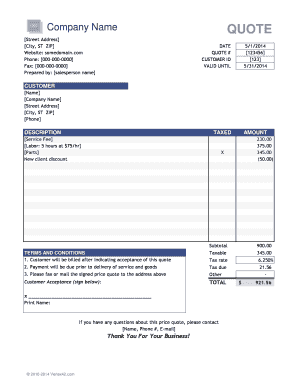
Get Price Quote Template - Gb.sa
How it works
-

Open form follow the instructions
-

Easily sign the form with your finger
-

Send filled & signed form or save
How to fill out the Price Quote Template - GB.SA online
Filling out the Price Quote Template - GB.SA online is straightforward and designed to help you present accurate pricing to your clients. This guide provides step-by-step instructions to ensure all necessary information is captured efficiently.
Follow the steps to complete the Price Quote Template - GB.SA accurately.
- Click ‘Get Form’ button to access the template and open it online.
- Begin by entering your company name and complete address in the designated fields. Ensure that your contact information, including phone number and website, is accurate.
- Input the date and QUOTE #. The date indicates when the quote was prepared, while the QUOTE # is a unique identifier for this specific quotation.
- Fill in the CUSTOMER ID and the customer’s details, including their name, company, address, and phone number.
- In the DESCRIPTION section, clearly outline the services or products being quoted. Provide unit prices and quantities for transparent pricing.
- Indicate whether the amounts are taxed by placing an 'X' in the appropriate column. This will help calculate the taxable subtotal correctly.
- Review the TERMS AND CONDITIONS section and ensure it reflects your company’s policies for billing and payment.
- Calculate the subtotal, tax rate, tax due, and any additional charges. Enter these amounts in their respective fields.
- For the CUSTOMER ACCEPTANCE area, include a space for the recipient's signature. This confirms their approval of the quote.
- Finally, save the completed document. You can choose to download it, print it, or share it directly with your customer.
Start filling out the Price Quote Template - GB.SA online today to streamline your quoting process.
How to write a quote? Choose a professional quote template. Enter your quote number. Add customer information. Add product or service descriptions. Add your business and contact information. Include the issue date. Specify the terms and conditions of your quote. Include notes and/or additional details.