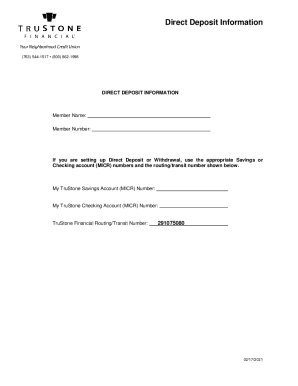
Direct Deposit Information(763) 5441517 (800) 8621998DIRECT DEPOSIT INFORMATIONMember Name: Member Number:If you are setting up Direct Deposit or Withdrawal, use the appropriate Savings or Checking.

How it works
  • Open form

    Open form follow the instructions

  • Easily sign form

    Easily sign the form with your finger

  • Share form

    Send filled & signed form or save

How to fill out the TruStone Financial Direct Deposit Information online

This guide provides clear and supportive instructions on how to complete the TruStone Financial Direct Deposit Information form online. Whether you are setting up direct deposit for the first time or updating your existing information, these steps will help ensure your information is accurately entered.

Follow the steps to successfully complete the direct deposit information form

  1. Click ‘Get Form’ button to access the document and open it in the designated editor.
  2. Enter your member name in the designated field. This name should match the one associated with your TruStone Financial account.
  3. Provide your member number in the appropriate space. Ensure that this number is accurate to avoid issues with your deposit.
  4. For direct deposit or withdrawal, select the necessary account type and input the correct Savings or Checking account (MICR) numbers in the corresponding fields.
  5. Input your TruStone Savings Account (MICR) number accurately to ensure correct processing of deposits into your savings account.
  6. Next, fill in your TruStone Checking Account (MICR) number to facilitate any necessary withdrawals or deposits.
  7. Finally, enter the TruStone Financial Routing/Transit number, which is essential for directing your deposits correctly to your accounts. The routing number is 291075080.
  8. Review all entered information for accuracy and completeness. Ensuring that every detail is correct will help prevent delays in the processing of your direct deposit.
  9. Save your changes to the form. You can also choose to download, print, or share this form as needed, ensuring you have a copy for your records.

Complete your TruStone Financial Direct Deposit Information form online today for seamless account management.

Get form

Experience a faster way to fill out and sign forms on the web. Access the most extensive library of templates available.

Related content

1. Effect of Agreement 2. Responsibility 3. Using...

You may follow up in writing to: TruStone Financial,. PO Box 1259, Minneapolis, MN...

Learn more
Canandaigua National Bank & Trust - Canandaigua...

As the only local, full-service, community-owned financial institution in the Greater...

Learn more
Financial Institution Address EIN 1590 AUTO SALES...

1156 KENNEBEC DRIVE CHAMBERSBURG, PA 17201. 236274650. 1ST EQUITY BANK. 3956 W DEMPSTER...

Learn more
Questions & Answers

Get answers to your most pressing questions about US Legal Forms API.

Contact support

How do I deposit a check with TruStone?

Steps to deposit a check with mobile deposit Log in to the Digital Banking App and click on Deposit Checks. Select the appropriate account, click on “Deposit a check,” and enter the check amount. Properly endorse your check by writing “For Mobile Deposit Only,” and on a separate line sign your name.

Determining your direct deposit status is as simple as logging into your online bank account to see if your money's arrived. If there is a delay, you may have to check with your employer's payroll department.

Our routing number is 291075080. A routing number is a 9 digit code used to identify financial... How can I find my member/account number? At TruStone Financial, your member number is the unique way we identify your membership.

The following limitations on the frequency and amount of TruStone Financial Debit Card transactions may apply: • You may complete a maximum of 15 TruStone Financial Debit Card purchases per day, • Purchase amounts are limited to $3,000.00 per day, • Cash withdrawals from an ATM are limited to a $500.00 daily limit, • ...

As a not-for-profit financial institution, we're different from a bank because our members are our owners (people who live, work, worship, attend school, or volunteer in our membership area). Our profits are returned as competitive rates, higher investment returns and fewer fees.

Which Routing Number Do You Use for a Direct Deposit? In order for you to receive money from a direct deposit, the person or institution making the deposit will need your bank's routing number, along with your account number, in order for you to receive the funds.

If you need to provide sensitive information for assistance, please call (800) 862-1998 or message us in the TruStone Financial mobile app. Tap “menu,” then “support,” then “conversation” and ask us anything.

How can I find my member/account number? Member Number: If you are not sure what your member number is, please contact us at (800) 862-1998 or visit a branch. Account Number: Your account number is listed in digital banking, under your account details.

Get This Form Now!

Use professional pre-built templates to fill in and sign documents online faster. Get access to thousands of forms.

If you believe that this page should be taken down, please follow our DMCA take down process here.

Get TruStone Financial Direct Deposit Information