Loading
Form preview
  • US Legal Forms
  • Form Library
  • Independent Agency Forms
  • Independent Agency USPS Forms
  • Usps Ps 3883-a 1994

Get Usps Ps 3883-a 1994-2026

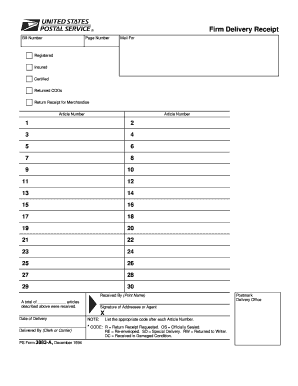
Priate code after each Article Number. * CODE: R = Return Receipt Requested. OS = Officially Sealed. RE = Re-enveloped. SD = Special Delivery. RW = Returned to Writer. DC = Received in Damaged Condition. Postmark Delivery Office .

How it works

  1. Open form

    Open form follow the instructions

  2. Easily sign form

    Easily sign the form with your finger

  3. Share form

    Send filled & signed form or save

How to fill out the USPS PS 3883-A online

The USPS PS 3883-A is a form used for documenting the delivery of various types of mail, including registered and certified items. This guide provides clear instructions for filling out this form online, ensuring a smooth and accurate completion process.

Follow the steps to successfully complete the USPS PS 3883-A online

  1. Press the ‘Get Form’ button to access the form and open it in the online editor.
  2. In the ‘Bill Number’ section, input the relevant billing number associated with the delivery.
  3. Fill in the ‘Page Number’ field with the corresponding page number of this delivery receipt.
  4. Under ‘Mail For’, specify the type of delivery service you are using, such as Registered, Insured, Certified, Returned CODs, or Return Receipt for Merchandise.
  5. In the ‘Article Number’ section, list each article number associated with the delivery, numbering them sequentially from 1 to 30.
  6. For each Article Number, indicate the appropriate code in the adjacent space, such as R for Return Receipt Requested or OS for Officially Sealed.
  7. Provide the printed name of the person receiving the articles in the ‘Received By’ field.
  8. Enter the total number of articles received in the designated space.
  9. Have the addressee or their agent sign the form in the ‘Signature of Addressee or Agent’ section.
  10. Record the date of delivery in the ‘Date of Delivery’ field.
  11. Identify the person who delivered the package by entering the name or signature of the clerk or carrier in the ‘Delivered By’ section.
  12. Once all fields are completed, you can save your changes, download the form, print it for your records, or share it online.

Complete your USPS PS 3883-A form online and ensure your delivery is documented accurately.

Get form

Experience a faster way to fill out and sign forms on the web. Access the most extensive library of templates available.
Get form

Related content

Mail Management and Distribution
Nov 26, 2024 — 1.6.6 Pick-up and sign for Certified, Registered, and Express mail at the...
Learn more
Newsletter
PS Form 3849- used to deliver personal registered mail. e. PS Form 3883/3883-A used to...
Learn more
COMPUTADORAS - Reproductores de medios digitales
... PS/2 interruptor. KVM con OSD. Administre múltiples. PC con un solo teclado, monitor...
Learn more

Related links form

MTUBATUBA Application For Registration Form.database.doc - Mtubatuba Org 2020 Nialexisplatform 2020 Form C (See Rule 14) ARRIVAL REPORT OF FOREIGNER IN ... - Ernakulamrural Keralapolice Gov 2020 Franchise Operations Manual Template Download 2020

Questions & Answers

Get answers to your most pressing questions about US Legal Forms API.

Contact support

When filling out a USPS customs form, start by indicating the type of package you are sending. Include details about the contents, their value, and the destination country. For enhanced shipping clarity, you can refer to USPS PS 3883-A, offering insights and guidance to ensure your customs form meets all regulations.

Filling out the USPS certified mail form requires clear information about the sender and recipient. You must provide the recipient's address, your return address, and additional details specified on the form. Utilizing resources like the USPS PS 3883-A can streamline this process, ensuring your mail is sent securely.

To fill out your USPS redelivery form, start by visiting the USPS website or your local post office. Locate the section for redelivery requests and enter the required details, such as your tracking number and address information. Be sure to check the status of your request using USPS PS 3883-A for additional insights, ensuring a seamless redelivery process.

A tort claim against the USPS involves seeking compensation for damages due to negligence or wrongful acts by postal employees. When filing this claim, it is essential to utilize the USPS PS 3883-A form, as it outlines the basis of your claim. Understanding the procedure can significantly help you navigate the claims process and improve your chances of receiving compensation.

To file a USPS tort claim, you should first complete the USPS PS 3883-A form, providing all necessary details about your case. Afterward, you send the completed form to the designated USPS claims office. Be sure to retain copies of all documents submitted to track your claim efficiently.

Starting a tort claim against the USPS involves filling out the appropriate forms, including the USPS PS 3883-A. You must provide detailed information about the incident and the damages you are claiming. Furthermore, understanding the requirements and adhering to the reporting timeline enhances your chances of a successful claim.

To file an issue with USPS, you can start by visiting their official website or calling their customer service. They provide comprehensive guidelines for submitting forms, including the USPS PS 3883-A for claims. Ensure you gather all relevant information and documentation to facilitate a smooth filing process and address your concerns promptly.

Yes, you can file a lawsuit against the USPS, but there are specific procedures to follow. First, you generally must file a claim with the USPS using the USPS PS 3883-A form before pursuing further legal action. This step is crucial, as the USPS has specific rules governing the claims process, which can impact your ability to seek compensation.

Filling out a USPS certified mail receipt and return receipt involves a few straightforward steps. Begin by filling out the certified mail receipt with your name, address, and the recipient's details. For the return receipt, ensure that you fill in the necessary information accurately to get a record of delivery, essential for secure mailings like those using USPS PS 3883-A.

To fill out a Certified Mail return receipt requested, start by completing the PS form 3883-A for Certification and then fill out the return receipt section. Clearly write the recipient's name and address in the designated area. After you've sent the item, you'll receive a return receipt that provides documentation of delivery.

Get This Form Now!

Use professional pre-built templates to fill in and sign documents online faster. Get access to thousands of forms.
Get form
If you believe that this page should be taken down, please follow our DMCA take down processhere.

Industry-leading security and compliance

US Legal Forms protects your data by complying with industry-specific security standards.
  • In businnes since 1997
    25+ years providing professional legal documents.
  • Accredited business
    Guarantees that a business meets BBB accreditation standards in the US and Canada.
  • Secured by Braintree
    Validated Level 1 PCI DSS compliant payment gateway that accepts most major credit and debit card brands from across the globe.
Get USPS PS 3883-A
Get form
  • Adoption
  • Bankruptcy
  • Contractors
  • Divorce
  • Home Sales
  • Employment
  • Identity Theft
  • Incorporation
  • Landlord Tenant
  • Living Trust
  • Name Change
  • Personal Planning
  • Small Business
  • Wills & Estates
  • Packages A-Z
  • Affidavits
  • Bankruptcy
  • Bill of Sale
  • Corporate - LLC
  • Divorce
  • Employment
  • Identity Theft
  • Internet Technology
  • Landlord Tenant
  • Living Wills
  • Name Change
  • Power of Attorney
  • Real Estate
  • Small Estates
  • Wills
  • All Forms
  • Forms A-Z
  • Form Library
  • Legal Hub
  • About Us
  • Help Portal
  • Legal Resources
  • Blog
  • Affiliates
  • Contact Us
  • Delete My Account
  • Site Map
  • Industries
  • Forms in Spanish
  • Localized Forms
  • State-specific Forms
  • Forms Kit
  • Real Estate Handbook
  • All Guides
  • Notarize
  • Incorporation services
  • For Consumers
  • For Small Business
  • For Attorneys
  • USLegal
  • FormsPass
  • pdfFiller
  • signNow
  • altaFlow
  • DocHub
  • Instapage
Form Packages
  • Adoption
  • Bankruptcy
  • Contractors
  • Divorce
  • Home Sales
  • Employment
  • Identity Theft
  • Incorporation
  • Landlord Tenant
  • Living Trust
  • Name Change
  • Personal Planning
  • Small Business
  • Wills & Estates
  • Packages A-Z
Form Categories
  • Affidavits
  • Bankruptcy
  • Bill of Sale
  • Corporate - LLC
  • Divorce
  • Employment
  • Identity Theft
  • Internet Technology
  • Landlord Tenant
  • Living Wills
  • Name Change
  • Power of Attorney
  • Real Estate
  • Small Estates
  • Wills
  • All Forms
  • Forms A-Z
  • Form Library
Customer Service
  • Legal Hub
  • About Us
  • Help Portal
  • Legal Resources
  • Blog
  • Affiliates
  • Contact Us
  • Delete My Account
  • Site Map
  • Industries
  • Forms in Spanish
  • Localized Forms
  • State-specific Forms
  • Forms Kit
Legal Guides
  • Real Estate Handbook
  • All Guides
Prepared for you
  • Notarize
  • Incorporation services
Our Customers
  • For Consumers
  • For Small Business
  • For Attorneys
Our Sites
  • USLegal
  • FormsPass
  • pdfFiller
  • signNow
  • altaFlow
  • DocHub
  • Instapage
Social Media
Call us now toll free:
+1 833 426 79 33
As seen in:
© Copyright 1999-2026 airSlate Legal Forms, Inc. 3720 Flowood Dr, Flowood, Mississippi 39232
  • Your Privacy Choices
  • Terms of Service
  • Privacy Notice
  • Content Takedown Policy
  • Bug Bounty Program