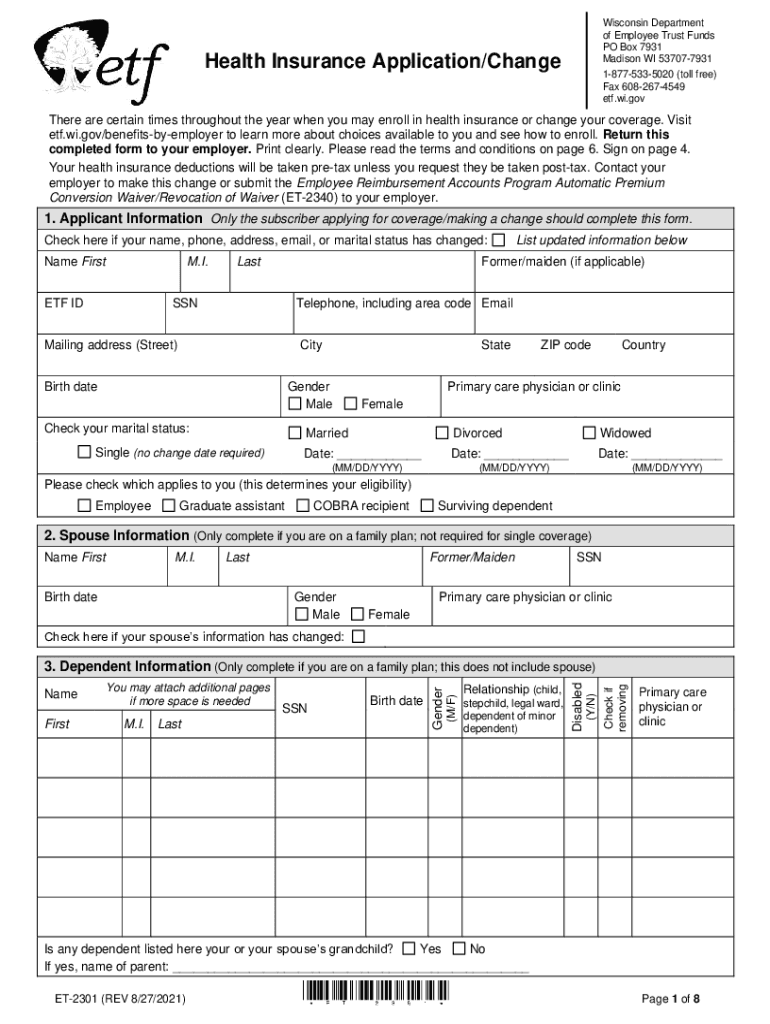
Wisconsin Department of Employee Trust Funds PO Box 7931 Madison WI 537077931Health Insurance Application/Change18775335020 (toll-free) Fax 6082674549 etf.wi.govThere are certain times throughout.

Open form follow the instructions

Easily sign the form with your finger

Send filled & signed form or save
How to fill out the WI ETF ET-2301 online
The WI ETF ET-2301 form is essential for individuals seeking to enroll in or update their health insurance coverage through the Wisconsin Department of Employee Trust Funds. This guide will provide you with a clear, step-by-step approach to filling out this form online, ensuring that you understand each section and field accurately.
Follow the steps to complete your health insurance application online.
- Click the ‘Get Form’ button to obtain the form and open it in the editor.
- Begin with Section 1, 'Applicant Information'. Fill in your first name, middle initial, last name, and ETF ID. If there are changes to your name, phone number, address, email, or marital status, check the designated box and provide updated information.
- Continue by entering your Social Security Number, telephone number, email address, mailing address, and date of birth. Select your gender and marital status, providing additional details where required.
- If you are applying for family coverage, complete Section 2, 'Spouse Information'. Fill in your spouse's name, birth date, Social Security Number, and gender. Indicate if there have been any changes to your spouse’s information.
- In Section 3, 'Dependent Information', list any dependents for whom you are applying insurance. Provide their relevant details including primary care physician, if applicable.
- Section 4 requires you to confirm your eligibility to enroll or make changes. Select the reason for your application, indicating if it's during open enrollment, a new hire, or due to a life event change.
- If applicable, Section 5 allows you to choose an 'It’s Your Choice' health plan design. Review the options available and select the plan that suits your needs.
- In Section 6, if prompted, select your specific health plan from the provided list. Make sure you are familiar with each plan's benefits and costs.
- For individuals covered by Medicare, Section 7 asks for Medicare numbers and eligibility reasons for you and your dependents.
- If you are removing dependents, go to Section 8 and provide the names and birth dates of those being removed.
- If you are changing from family to individual coverage, complete Section 9 outlining why and when the changes are to take effect.
- To cancel your health insurance coverage, fill out Section 10, indicating the reason for cancellation.
- In Section 11, indicate whether you or any dependents have other health insurance coverage. Provide the necessary details if applicable.
- For state employees opting out of health insurance for the incentive, complete Section 12.
- Finally, sign and date Section 13 to certify the application is complete. Return the completed form to your employer.
Complete your WI ETF ET-2301 form online today to ensure your health coverage is accurately managed.
Experience a faster way to fill out and sign forms on the web. Access the most extensive library of templates available.
Related content
Return this completed form to your employer. Employer must review the completed...
There are certain times throughout the year when you may enroll in health insurance or...
P2301. ECU Internal Failure. P0606. Crankshaft Position Sensor Failure ... Waukesha, WI...
Get answers to your most pressing questions about US Legal Forms API.
Can you change your mind about insurance?
When you take out a car insurance policy, by law, you'll be entitled to a “cooling off” period. That means you have at least 14 days from when you receive the paperwork to change your mind about your insurance, cancel your policy and get a refund.
Can I delete my marketplace application and start over?
You can cancel your Marketplace coverage any time. You may need to do this if you get other health coverage, or for another reason. You can end coverage for: Everyone on the application after your coverage has started.
What is the best way to change an application insurance?
To report changes, call Covered California at (800) 300-1506 or log in to your online account. You can also find a Licensed Insurance Agent, Certified Enrollment Counselor or county eligibility worker who can provide free assistance in your area.
What happens if you don't report changes to OHP?
Why it's important to update your application immediately. If your income estimate goes up or you lose a household member: You may qualify for less savings than you're getting now. If you don't report the change, you could have to pay money back when you file your federal tax return.
How often can you make changes to your insurance?
Changing health insurance after open enrollment: Can I switch anytime? In most cases, you can only sign up for or update your health insurance during the annual Open Enrollment Period. However, if you experience certain qualifying life events, you may also become eligible for a Special Enrollment Period.
Use professional pre-built templates to fill in and sign documents online faster. Get access to thousands of forms.
If you believe that this page should be taken down, please follow our DMCA take down process here.