Loading
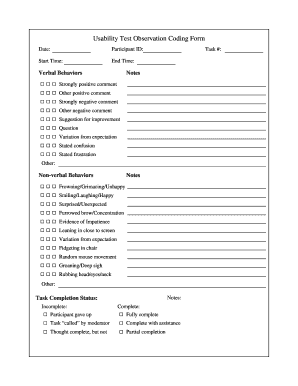
Get Usability Test Observation Coding Form
How it works
-

Open form follow the instructions
-

Easily sign the form with your finger
-

Send filled & signed form or save
How to fill out the Usability Test Observation Coding Form online
Filling out the Usability Test Observation Coding Form online is a crucial step in documenting user interactions during usability tests. This guide will provide clear and detailed instructions on how to effectively complete each section of the form.
Follow the steps to accurately complete the usability test observation coding form.
- Press the ‘Get Form’ button to access the form and open it in your online editor.
- Begin with the date field. Enter the date of the usability test observation.
- Next, input the participant ID. This should be a unique identifier assigned to each user participating in the test.
- Record the start time and end time of the observation. Ensure the times are accurate to maintain the integrity of the test results.
- In the verbal behaviors section, indicate the task number being observed and document any relevant notes. Use the provided options to categorize comments such as strongly positive, other positive, strongly negative, other negative, suggestions for improvement, questions, variations from expectation, stated confusion, stated frustration, or other.
- In the non-verbal behaviors section, write any notes. Mark observed behaviors like frowning, smiling, signs of impatience, or other notable actions that occurred during the test.
- For task completion status, select the appropriate option indicating whether the participant completed the task or if it was incomplete. Note if the task was called by the moderator or completed with assistance.
- After filling out all the required fields, review your entries for accuracy and completeness.
- Finally, you can save changes, download the filled form, print it, or share it with relevant stakeholders as needed.
Complete the Usability Test Observation Coding Form online today for effective documentation of your usability testing.
Related links form
A 5-step process for usability testing Step 1: plan the session. Planning the details of the usability testing session is, in some ways, the most crucial part of the entire process. ... Step 2: recruiting participants. ... Step 3: designing the task(s) ... Step 4: running the session. ... Step 5: analyzing the insights.