Loading
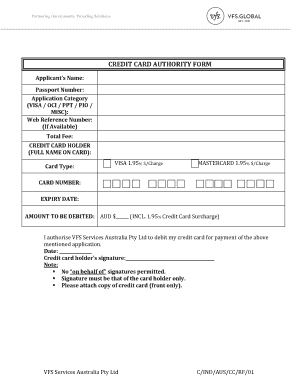
Get Credit Card Authority Form - Vfs Global
How it works
-

Open form follow the instructions
-

Easily sign the form with your finger
-

Send filled & signed form or save
How to fill out the CREDIT CARD AUTHORITY FORM - VFS Global online
The CREDIT CARD AUTHORITY FORM - VFS Global is a vital document that allows applicants to authorize the use of their credit card for processing fees associated with various application categories. This guide provides a step-by-step approach to help users complete the form accurately and efficiently.
Follow the steps to complete the form with ease.
- Click ‘Get Form’ button to obtain the form and open it in the editor.
- Begin filling out the applicant’s name clearly in the designated field. Ensure that the name matches the identification documents provided.
- Enter the passport number in the next section. This number should correspond with the passport being used for the application.
- Select the application category by marking either VISA, OCI, PPT, PIO, or MISC in the specified section.
- If you have a web reference number, include it in the field provided. This helps in tracking your application.
- Clearly indicate the total fee associated with the application, ensuring accuracy in this section.
- In the CREDIT CARD HOLDER section, write the full name as it appears on the credit card carefully.
- Select the card type by marking either VISA or MASTERCARD. Note that there is a surcharge of 1.95% applicable for both types.
- Fill in your credit card number in the appropriate field, ensuring no numbers are omitted.
- Enter the expiry date of the credit card, ensuring the format is correct.
- Indicate the amount to be debited, which should include the total fee and the applicable surcharge, formatted correctly in AUD.
- Read the authorization statement carefully and ensure you agree to allow VFS Services Australia Pty Ltd to debit your card.
- Date the form by writing the current date in the specified field.
- Provide the credit card holder’s signature in the designated area. Remember that the signature must belong to the individual whose name is on the card, and no proxies are allowed.
- Attach a copy of the front of your credit card to the form for verification purposes.
- Once all fields are complete, save the changes to your document. You can then download, print, or share the form as needed.
Complete your documents online with our easy-to-follow guides today.
What to Include in a Credit Card Authorization Form Cardholder name. Card number. Card type (Mastercard, Visa, American Express, Discover, etc.) Expiration date. Cardholder's billing ZIP code. Merchant name. A statement that authorizes the charge(s) Cardholder signature and signing date.