Loading
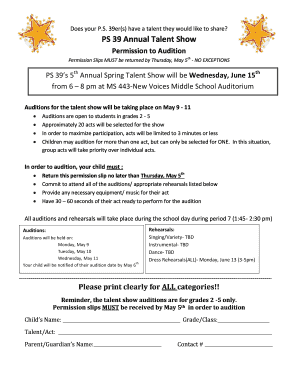
Get Talent Show Audition Permission Form - Ps 39 - Ps39
How it works
-

Open form follow the instructions
-

Easily sign the form with your finger
-

Send filled & signed form or save
How to use or fill out the Talent Show Audition Permission Form - PS 39 - Ps39 online
The Talent Show Audition Permission Form - PS 39 - Ps39 is essential for students wishing to participate in the annual talent show at PS 39. This guide will provide you with a comprehensive overview of how to accurately complete the form online.
Follow the steps to successfully fill out the Talent Show Audition Permission Form.
- Click ‘Get Form’ button to obtain the Talent Show Audition Permission Form and open it in the editor.
- Begin by clearly printing the child’s name in the designated field. Ensure this is legible as it is important for audition records.
- Next, fill out the grade or class of the child in the corresponding section. This helps the organizers identify which students are eligible.
- In the talent/act section, describe what your child will be performing. Be specific to assist in scheduling the auditions.
- Enter the parent or guardian's name in the provided field to confirm who is responsible for the child.
- Provide a contact number where the parent or guardian can be reached. This is vital for communication regarding auditions.
- After completing all fields, review the information for clarity and accuracy. Ensure that everything is filled out appropriately.
- Once the form is complete and reviewed, save the changes, and you may either download, print, or share the form to submit it by the deadline.
Complete the Talent Show Audition Permission Form online today to secure your child's spot in the auditions!