Loading
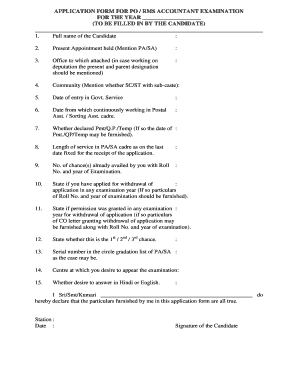
Get Application Form For Accountant Exam - Borissapostbbgovbbinb - Orissapost Gov
How it works
-

Open form follow the instructions
-

Easily sign the form with your finger
-

Send filled & signed form or save
How to fill out the APPLICATION FORM FOR ACCOUNTANT EXAM - Borissapostbbgovbbinb - Orissapost Gov online
Filling out the application form for the Accountant Exam is an important step in your journey toward certification. This guide provides clear and detailed instructions to help you complete the application accurately and efficiently.
Follow the steps to successfully complete the application form.
- Click ‘Get Form’ button to obtain the application form and open it in the designated editor.
- Input your full name in the designated field, ensuring it matches the name on your official documents.
- Indicate your current appointment by specifying whether you are a Postal Assistant (PA) or Sorting Assistant (SA).
- Provide the name of the office to which you are currently attached. If you are working on deputation, mention both your present and parent designations.
- Specify your community status, including whether you belong to the SC/ST category and your sub-caste.
- Enter the date you began your service in government.
- State the date from which you have been continuously working in the Postal Assistant or Sorting Assistant cadre.
- Indicate whether you have declared payment, qualified payment (QP), or temporary status, along with the corresponding dates.
- Detail your length of service in the PA/SA cadre as of the last date for application submission.
- List the number of chances you have already availed, providing your roll number and the year of each examination.
- State if you have applied for the withdrawal of an application in any examination year, including roll number and year.
- Indicate whether permission was granted for withdrawal in previous years, with details of the communication and relevant roll number.
- Specify which chance this application represents in your examination history (1st, 2nd, or 3rd chance).
- Provide your serial number from the circle gradation list for PA/SA.
- Choose your preferred examination center.
- Indicate whether you wish to answer in Hindi or English.
- Complete the declaration section with your name and sign at the designated place.
- Once all fields are filled, review your application for accuracy. After ensuring that all information is correct, you can save your changes, download, print, or share the completed form.
Take a moment to fill out the application form online and move one step closer to your accounting certification.
Industry-leading security and compliance
US Legal Forms protects your data by complying with industry-specific security standards.
-
In businnes since 199725+ years providing professional legal documents.
-
Accredited businessGuarantees that a business meets BBB accreditation standards in the US and Canada.
-
Secured by BraintreeValidated Level 1 PCI DSS compliant payment gateway that accepts most major credit and debit card brands from across the globe.