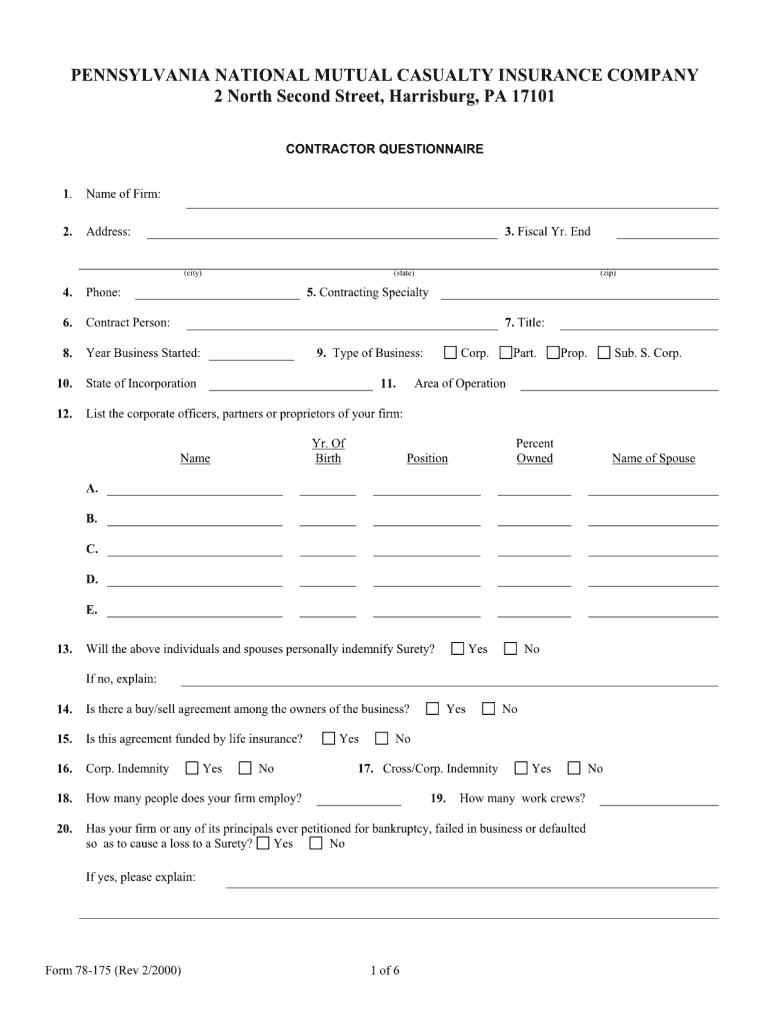
PENNSYLVANIA NATIONAL MUTUAL CASUALTY INSURANCE COMPANY 2 North Second Street, Harrisburg, PA 17101 CONTRACTOR QUESTIONNAIRE 1. 2. Name of Firm: Address: (city) (state) 3. Fiscal Yr. End (zip) 4.
Loading

Open form follow the instructions

Easily sign the form with your finger

Send filled & signed form or save
How to fill out the PA 78-175 online
Filling out the PA 78-175 form online can streamline your process and ensure that all necessary information is collected accurately. This guide will provide you with clear, step-by-step instructions to help you complete the form successfully.
Follow the steps to efficiently complete the PA 78-175 online.
- Click the ‘Get Form’ button to access the PA 78-175 form and open it in your preferred document editor.
- Begin by entering your personal information in the designated fields. This typically includes your full name, contact information, and any relevant identification numbers.
- In the next section, provide details about your situation as required by the form. Be sure to review all prompts and fill in any specific information needed.
- Once all required fields are filled in, take a moment to review the information for accuracy and completeness, correcting any errors you may find.
- After verifying your information, you can save your changes. Options to download, print, or share the completed form will usually be available to you.
Take the next step in your process by completing your documents online with confidence.
Experience a faster way to fill out and sign forms on the web. Access the most extensive library of templates available.
Related content
The Board of Trustees for the Community-Technical Colleges shall establish procedures for...
Jun 14, 1991 — 77-573 substituted board of higher education for commission for higher...
by DJ Glover · 1979 · Cited by 21 — NSWC/WOL TR 78-175. SUMMARY. This report describes...
Use professional pre-built templates to fill in and sign documents online faster. Get access to thousands of forms.
If you believe that this page should be taken down, please follow our DMCA take down process here.