Loading
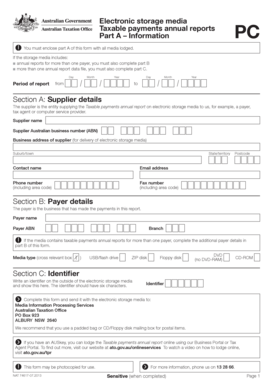
Get Taxable Payments Annual Reports Part A Information Pc - Ato Gov
How it works
-

Open form follow the instructions
-

Easily sign the form with your finger
-

Send filled & signed form or save
How to use or fill out the Taxable Payments Annual Reports Part A Information PC - Ato Gov online
This guide provides clear, step-by-step instructions on completing the Taxable Payments Annual Reports Part A Information PC online. Whether you are a payer or a supplier, this comprehensive resource will help you navigate the form accurately and efficiently.
Follow the steps to complete your Taxable Payments Annual Reports part A online.
- Press the ‘Get Form’ button to access the form and open it in your preferred editor.
- Fill out the report period. Enter the start and end dates of the reporting period in the format specified: 'Day', 'Month', 'Year'.
- Complete Section A: Supplier details. Provide the name, Australian Business Number (ABN), business address, and contact information for the supplier responsible for the report.
- In Section B: Payer details, input the payer's name and ABN. If the media includes reports for multiple payers, ensure to complete additional details as required.
- Select the media type by checking the relevant box for USB/flash drive, ZIP disk, floppy disk, DVD, or CD-ROM.
- In Section C: Identifier, create and write a six-character identifier. This identifier is important for identifying your electronic storage media.
- Review all sections for accuracy and completeness before enclosing Part A of the form with the electronic storage media.
- Consider additional steps if including reports for multiple payers by completing Part B, or for multiple files by completing Part C as outlined in the form.
- Once all sections are filled, save your changes and make sure the completed form is sent with the electronic storage media to the specified address.
Ensure you complete the Taxable Payments Annual Report online to meet your obligations efficiently.
Some businesses and government entities need to lodge a Taxable payments annual report (TPAR). You lodge a TPAR for payments made to contractors for services. Some government entities need to report grants paid to people or organisations with an Australian business number (ABN).
Industry-leading security and compliance
US Legal Forms protects your data by complying with industry-specific security standards.
-
In businnes since 199725+ years providing professional legal documents.
-
Accredited businessGuarantees that a business meets BBB accreditation standards in the US and Canada.
-
Secured by BraintreeValidated Level 1 PCI DSS compliant payment gateway that accepts most major credit and debit card brands from across the globe.