Loading
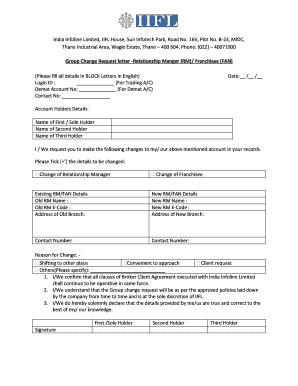
Get New Group Change Letter - Iifl
How it works
-

Open form follow the instructions
-

Easily sign the form with your finger
-

Send filled & signed form or save
How to fill out the New Group Change Letter - IIFL online
Filling out the New Group Change Letter - IIFL online is an essential process for users looking to update their account details with India Infoline Limited. This guide provides a clear and supportive step-by-step approach to assist you in completing the form accurately.
Follow the steps to fill out the New Group Change Letter - IIFL successfully.
- Press the ‘Get Form’ button to obtain the form and open it in the editor.
- Begin by filling in your login ID for your trading account in the designated field.
- Enter your demat account number in the required section below the login ID.
- Input your contact number in the space provided.
- Specify the date on which you are filling out the form.
- Fill in the details of the account holders, including names of the first, second, and third holders using BLOCK letters in English.
- Indicate the changes you wish to make by ticking the appropriate boxes for either 'Change of Relationship Manager' or 'Change of Franchisee'.
- Provide the existing Relationship Manager or Franchisee details, including old RM name, old RM E-Code, and address of the old branch.
- Enter the new Relationship Manager or Franchisee details, including new RM name, new RM E-Code, and address of the new branch.
- List the reason for the change by ticking the relevant option, or specify another reason if applicable.
- Review the declarations made regarding the Broker Client Agreement and ensure you understand the implications of your request.
- Have each account holder sign the form in the spaces provided for the first, second, and third holders.
- Once all sections are completed and reviewed, save your changes, and proceed to download, print, or share the form as needed.
Complete your documents online today for a seamless experience.
Steps to close the Demat account: Download the account closure form from here by selecting the right option. Fill all the required information like client ID, DP ID, name, address, and the reason for closing the account. All account holders must sign the form.
Industry-leading security and compliance
US Legal Forms protects your data by complying with industry-specific security standards.
-
In businnes since 199725+ years providing professional legal documents.
-
Accredited businessGuarantees that a business meets BBB accreditation standards in the US and Canada.
-
Secured by BraintreeValidated Level 1 PCI DSS compliant payment gateway that accepts most major credit and debit card brands from across the globe.