Loading
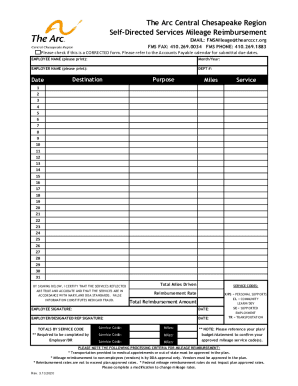
Get The Arc Ccr Mileage Reimbursement Form 2.26.2020.xlsx
How it works
-

Open form follow the instructions
-

Easily sign the form with your finger
-

Send filled & signed form or save
How to fill out the The Arc CCR Mileage Reimbursement Form 2.26.2020.xlsx online
Filling out The Arc CCR Mileage Reimbursement Form online is a straightforward process that ensures you accurately report your mileage for reimbursement. This guide will provide you with step-by-step instructions to help you navigate through each section of the form seamlessly.
Follow the steps to complete your mileage reimbursement form.
- Press the ‘Get Form’ button to access the form and open it in your preferred online editor.
- Begin by entering your name in the ‘EMPLOYEE NAME’ field, ensuring it is printed clearly for accuracy. Next, fill in the ‘Month/Year’ you are submitting this reimbursement for.
- In the ‘EMPLOYER NAME’ field, provide the name of your employer. Next, enter the department number in the ‘DEPT #’ field, which helps in tracking your submission.
- For each trip, fill in the following fields: ‘Date’ of travel, ‘Destination’ where you traveled, and the reason or ‘Purpose’ for the trip. Input the number of ‘Miles’ driven for that trip.
- Repeat step 4 for each trip you are claiming. Ensure to use the remaining available lines (1 to 31) to accurately record all trips for the month.
- Upon completion of the trip entries, total the miles driven in the ‘Total Miles Driven’ field at the bottom of the section.
- Review and select the appropriate service codes based on the services provided during the trips. Use the ‘SERVICE CODES’ section for reference to identify the correct codes.
- Calculate your reimbursement amount by multiplying the total miles driven by the ‘Reimbursement Rate’ indicated in the form. Enter the total in the ‘Total Reimbursement Amount’ field.
- Both the employee and employer or designated representative need to sign in the respective signature fields to certify the accuracy of the information provided and compliance with Maryland DDA standards.
- After completing all sections, save your changes to the form. You can then download, print, or share the completed document as necessary.
Complete your mileage reimbursement form online today for a smooth reimbursement process.
A Mileage Reimbursement Form is a document that is given to the accounting department for reimbursement of the traveling costs. Mileage reimbursements are usually done on a bi-monthly or a monthly basis.
Industry-leading security and compliance
US Legal Forms protects your data by complying with industry-specific security standards.
-
In businnes since 199725+ years providing professional legal documents.
-
Accredited businessGuarantees that a business meets BBB accreditation standards in the US and Canada.
-
Secured by BraintreeValidated Level 1 PCI DSS compliant payment gateway that accepts most major credit and debit card brands from across the globe.