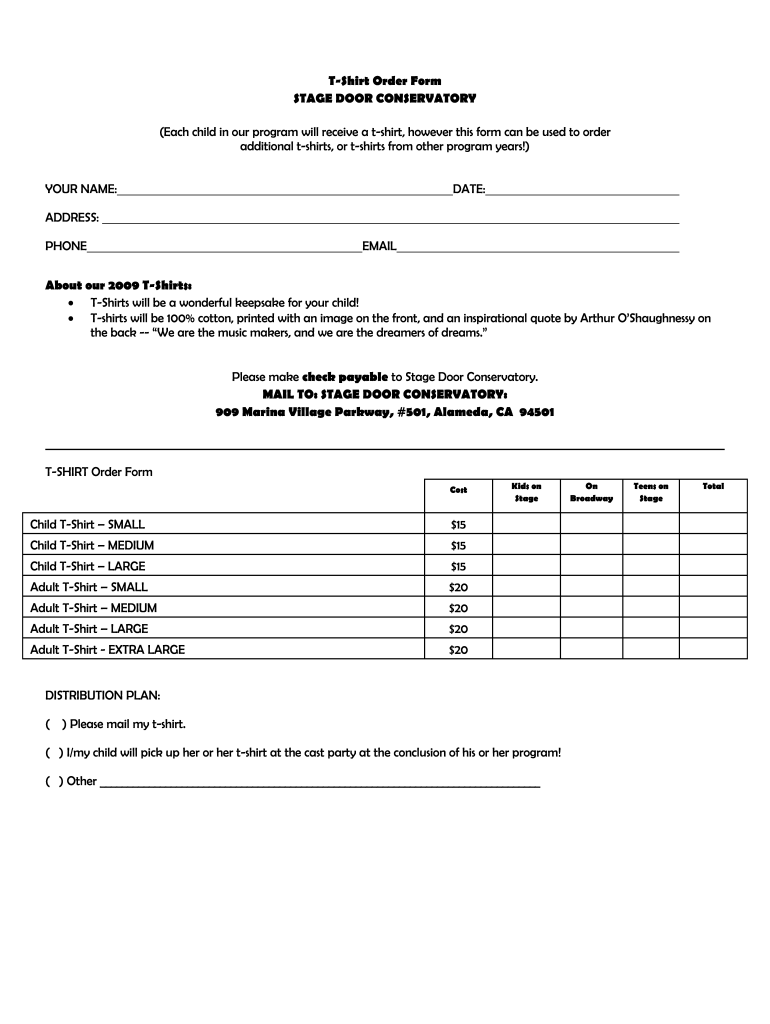
NAME: DATE: ADDRESS: PHONE EMAIL About our 2009 T-Shirts: • T-Shirts will be a wonderful keepsake for your child! • T-shirts will be 100% cotton, printed with an image on the front, and an inspirational quote by Arthur O’Shaughnessy on the back -- “We are the music makers, and we are the dreamers of dreams.” Please make check payable to Stage Door Conservatory. MAIL TO: STAGE DOOR CONSERVATORY: 909 Marina Village Parkway, #501, Alameda, CA 94501 T-SHIRT Order Form Cost Child T-S.
Loading

Open form follow the instructions

Easily sign the form with your finger

Send filled & signed form or save
How to fill out the Stage Door Conservatory T-Shirt Order Form online
This guide will assist you in completing the Stage Door Conservatory T-Shirt Order Form online with ease. Follow these instructions to ensure you provide all necessary information for your additional t-shirt order.
Follow the steps to complete your t-shirt order form.
- Click the ‘Get Form’ button to download the T-Shirt Order Form and access it in the editor.
- Begin by entering your name in the designated field to identify yourself as the orderer.
- Input the date you are filling out the form. This helps keep track of your order timeline.
- Provide your address where the t-shirts will be delivered or where you will be picking them up.
- Enter your phone number for any follow-up regarding your order.
- Fill in your email address to receive confirmation and updates about your order.
- Select the t-shirt sizes and quantities you wish to order from the options available, noting the costs next to each size.
- Indicate your preferred distribution plan by checking the appropriate box: mailing to your address or picking up at the cast party.
- Calculate the total amount due based on your selections and prepare a check payable to Stage Door Conservatory.
- Finally, review all your entries for accuracy before saving your changes, and ensure the form is complete. You can download, print, or share the completed form as needed.
Complete your T-Shirt Order Form online today and secure your child's keepsake!
Experience a faster way to fill out and sign forms on the web. Access the most extensive library of templates available.
Related content
Aug 4, 2023 — The CSSSA faculty is composed of professional artists and arts educators...
by LR Epling · 2010 · Cited by 1 — This Honors Thesis - Open Access is brought to you...
Feb 15, 2016 — It was used as a door stop to keep the door to the conservatory open...
Get answers to your most pressing questions about US Legal Forms API.
How to create an order form in Google Forms?
Creating an order form in Google Forms involves a few simple steps. Start by opening Google Forms and selecting a new form template. For the Stage Door Conservatory T-Shirt Order Form, include fields for customer details, shirt sizes, and special requests to enhance clarity. Configuring the form with response options will make it user-friendly and efficient.
How do I create a fillable order form?
To create a fillable order form, use Google Forms to gather information easily and efficiently. You can begin by adding various question types, ensuring that users can enter their details without confusion. The Stage Door Conservatory T-Shirt Order Form can be designed to accept inputs for sizes, quantities, and contact information seamlessly, delivering a smooth user experience.
How to do a t-shirt order form on Google Forms?
Creating a t-shirt order form on Google Forms is a straightforward process. First, navigate to Google Forms and select 'Blank Form' to start fresh. After that, focus on adding relevant questions—such as size, color, and number of shirts—tailored to the Stage Door Conservatory T-Shirt Order Form. Don’t forget to utilize validation settings to ensure accurate responses.
What do you put on a shirt order form?
structured Stage Door Conservatory TShirt Order Form should include key elements such as the tshirt design, size options, quantity, and the buyer's contact information. You might also consider including a section for special requests, ensuring customers can express their preferences clearly. Providing clear instructions for completing the form will help streamline the ordering process.
How to create a t-shirt order form in Google Forms?
To create a Stage Door Conservatory T-Shirt Order Form in Google Forms, start by accessing your Google Drive and selecting the option to create a new form. Then, add fields that collect essential information such as shirt size, quantity, and contact details. Customizing the form with a title and description will guide users through the ordering process, making it intuitive and efficient.
What should an order form look like?
An effective Stage Door Conservatory T-Shirt Order Form should be clear and organized, featuring designated areas for every piece of information needed. Use simple layouts with easy-to-read fonts to enhance usability. Ideally, the form should also have a professional appearance to instill confidence in your brand while making it straightforward for users to complete.
What words to put on a shirt?
When thinking about words for your t-shirt, consider using engaging phrases or slogans that resonate with the Stage Door Conservatory community. You might include inspiring quotes or school-specific symbols, making the shirts memorable for wearers. This not only elevates the t-shirt's appeal but also fosters a sense of belonging.
What to include on a t-shirt order form?
A comprehensive Stage Door Conservatory T-Shirt Order Form should feature sections for customization options, such as colors or designs. Including a space for special requests can also enhance the customer experience. Furthermore, ensure you capture the customer's agreement to your terms and conditions, which helps protect both parties.
How to create a sales order form?
To create a sales order form, start by determining what information you need to capture, like customer details, product types, and prices. You can utilize templates found on platforms such as USLegalForms to ensure accuracy and professionalism. Creating a comprehensive Stage Door Conservatory T-Shirt Order Form will facilitate smooth transactions.
How do you arrange t shirts?
Arranging t-shirts can be done in various ways based on your display needs. You can group them by size, color, or design to enhance visibility and organization. When you have a well-arranged collection, it’s easier to manage orders on your Stage Door Conservatory T-Shirt Order Form.
Use professional pre-built templates to fill in and sign documents online faster. Get access to thousands of forms.
If you believe that this page should be taken down, please follow our DMCA take down process here.