Loading
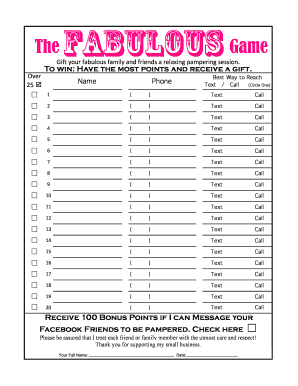
Get Fabulous Referral Sheet - 20 Namesxlsx
How it works
-

Open form follow the instructions
-

Easily sign the form with your finger
-

Send filled & signed form or save
How to fill out the Fabulous Referral Sheet - 20 Namesxlsx online
Filling out the Fabulous Referral Sheet - 20 Namesxlsx online is a straightforward process that helps you share vital contact information with your network. This guide provides clear instructions to complete each section efficiently and accurately.
Follow the steps to complete the referral sheet online.
- Click ‘Get Form’ button to access the Fabulous Referral Sheet - 20 Namesxlsx and open it in your preferred editor.
- Begin by filling out the name and phone number fields for each individual you wish to refer. You will see spaces provided for 20 names.
- For each name listed, indicate the best way to reach that person by circling either 'Text' or 'Call'. This helps ensure your communication method is preferred.
- Once you have entered all required information, review the details to make sure everything is accurate and complete.
- At the bottom of the sheet, enter your full name and the date to ensure the document is finalized.
- You can now save your changes, download the completed document, and choose to print or share it as needed.
Start filling out your referral sheet online today to connect with your network.