Loading
Get Canada Alberta At2054 2020
How it works
-

Open form follow the instructions
-

Easily sign the form with your finger
-

Send filled & signed form or save
How to fill out the Canada Alberta AT2054 online
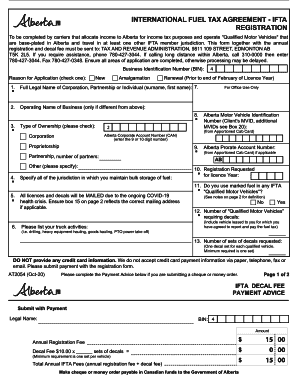
The Canada Alberta AT2054 form is essential for carriers who operate qualified motor vehicles and allocate income to Alberta for tax purposes. This guide will help you navigate through the electronic completion of the form, ensuring all necessary information is accurately provided.
Follow the steps to successfully complete your Canada Alberta AT2054 online.
- Click ‘Get Form’ button to obtain the form and open it in the editor.
- Begin by entering your Business Identification Number (BIN) and select the reason for your application by checking the appropriate box (new, amalgamation, or renewal).
- Provide the full legal name of the corporation, partnership, or individual, followed by the operating name of the business if it differs from the legal name.
- Indicate the type of ownership by checking one of the provided options: proprietorship, partnership (specifying the number of partners), or other (specify).
- List all jurisdictions where you maintain bulk storage of fuel. This information is important for compliance.
- Document your truck activities, for example, drilling, heavy equipment hauling, or goods hauling.
- Provide the Alberta Motor Vehicle Identification Number, Alberta Corporate Account Number, and Alberta Prorate Account Number (if applicable).
- Select the registration requested for the licence year and indicate whether you use marked fuel in any IFTA qualified motor vehicles.
- Specify the number of qualified motor vehicles requiring decals and the number of sets of decals requested.
- Complete the Payment Advice section if submitting a cheque or money order and ensure to make payments in Canadian funds to the Government of Alberta.
- If applicable, specify your IFTA agent's information, including their name and telephone number.
- Fill in the carrier mailing address if you do not have an IFTA agent or wish communications sent to a different address.
- Provide the physical location if different from the mailing address, including the city, province/state, and postal/zip code.
- List the name and address of your business bank, as well as the authorized signing officers of your business.
- Indicate if your IFTA licence has ever been revoked or suspended by any jurisdiction.
- Complete the certification section, agreeing to the terms and conditions of the IFTA and signing the form.
- Finally, save changes, download, print, or share the completed form as needed.
Start completing your Canada Alberta AT2054 online today.
Get form
Experience a faster way to fill out and sign forms on the web. Access the most extensive library of templates available.
Related links form
Get This Form Now!
Use professional pre-built templates to fill in and sign documents online faster. Get access to thousands of forms.