Loading
Get Ny Csc-1 2019-2026
How it works
-

Open form follow the instructions
-

Easily sign the form with your finger
-

Send filled & signed form or save
How to fill out the NY CSC-1 online
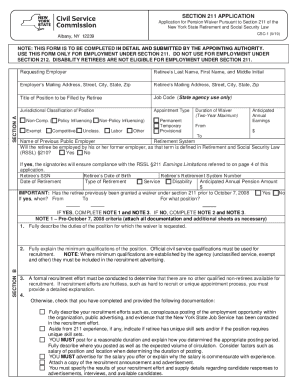
Filling out the NY CSC-1 form is an essential step for those seeking a pension waiver under Section 211 of the New York State Retirement and Social Security Law. This guide will provide you with clear, step-by-step instructions to assist you in completing the form accurately and efficiently.
Follow the steps to complete the NY CSC-1 form online
- Press the ‘Get Form’ button to access the CSC-1 application form and open it in your preferred digital editor.
- Begin by entering the retiree's last name, first name, and middle initial in the designated fields at the top of the form.
- Next, provide the employer’s mailing address, including street, city, state, and zip code. It's important to ensure that this information is accurate.
- Fill out the retiree’s mailing address in a similar manner, ensuring that all street, city, state, and zip code information is complete.
- In the section for the title of the position to be filled by the retiree, clearly indicate the job title that corresponds to the vacancy.
- Include the job code, which is designated for state agency use only, to assist in tracking the application.
- Select the jurisdictional classification of the position. Choose between options such as competitive, non-competitive, exempt, etc., as appropriate.
- Indicate the appointment type by selecting whether it is permanent, temporary, or provisional.
- Provide the duration of the waiver you are requesting, noting that it cannot exceed two years.
- Estimate the anticipated annual earnings for the position by entering the amount in the fields provided.
- Fill in the required retiree details, such as the retirement system, previous employer’s name, retirement system number, social security number, date of birth, date of retirement, and type of retirement (service or disability).
- Indicate the anticipated annual pension amount being paid to the retiree.
- If applicable, state whether the retiree has previously been granted a waiver under Section 211 prior to October 7, 2008, providing dates and positions earlier held.
- Complete Section B, detailing recruitment efforts, minimum qualifications for the position, and any unique skills that the retiree may possess.
- Conclude by signing the certification sections required from both the appointing authority and retiree, ensuring all information is accurate and truthful.
- Once completed, you can save the changes, download the filled-out form, print it, or share it as needed.
Start filling out the NY CSC-1 form online today to ensure your application for a pension waiver is processed promptly.
CSC Agreement means the Agreement for Computerized Credit Reporting Services and Options to Purchase and Sell Assets, dated as of the 1st day of August, 1988, among EIS, the Company, CSC and certain other parties, as the same may be amended, amended and restated, supplemented or otherwise modified from time to time.