E Canadian travel document is still valid, you must include it with your application. Would you like the previous passport returned to you? If not, it will be securely destroyed by the Passport Program to protect the child's personal information. Yes, please return it to me. Note: If a valid Canadian travel document has been lost, stolen, damaged or is inaccessible, complete form PPTC 203, Declaration concerning lost, stolen, inaccessible, damaged or found Canadian travel document, available onl.
Loading

Open form follow the instructions

Easily sign the form with your finger

Send filled & signed form or save
How to fill out the Canada PPTC 155 online
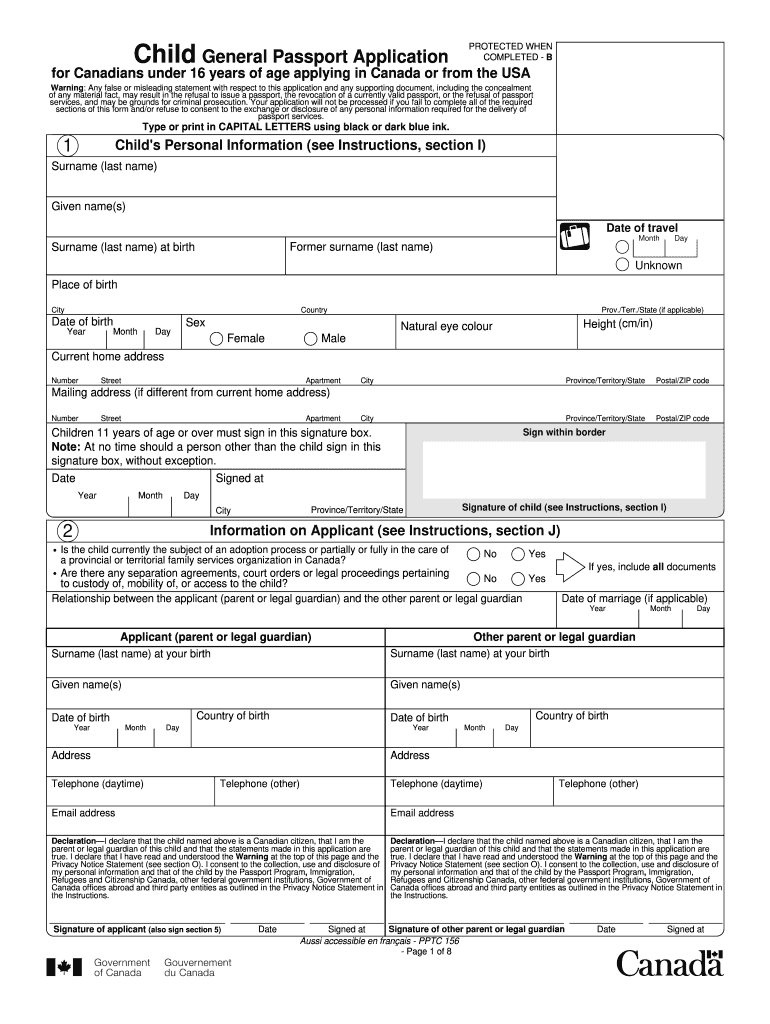
Filling out the Canada PPTC 155 form online can be straightforward if you follow the correct steps. This guide provides detailed instructions on how to complete each section of the application for children under 16 years of age applying for a Canadian passport.
Follow the steps to successfully complete the Canada PPTC 155 form.
- Press the ‘Get Form’ button to access the form and open it in your browser.
- Begin by filling out the child's personal information. Ensure to enter the surname, given names, date of travel, place of birth, and date of birth accurately.
- Provide the child’s sex, height, and natural eye color. Also, enter the current home address and any different mailing address if applicable.
- Children aged 11 years and older must sign in the designated signature box. Ensure the date of signing and the place of signature are also noted.
- Proceed to the 'Information on Applicant' section. Answer whether the child is currently under an adoption process or in the care of a family services organization.
- Complete the relationship details between the applicant and the other guardian, including phone numbers and email addresses as required.
- Sign the declaration statement confirming the truthfulness of the application and consent to the disclosure of personal information.
- Provide information about any previous Canadian travel document issued to the child. Specify the details if applicable.
- Attach proof of Canadian citizenship by listing the document you will submit with this application.
- Fill in the guarantor's details to certify the application. Ensure they are eligible and have known the applicant for at least two years.
- Include emergency contact information if desired. This is optional but can be beneficial.
- Finally, review all completed sections carefully, save your changes, and prepare to download, print, or share the completed form.
Complete your Canada PPTC 155 application online today for a seamless passport application process.
Experience a faster way to fill out and sign forms on the web. Access the most extensive library of templates available.
Related content
Oct 31, 2013 — This section prescribes requirements for specific materials and...
Canadians under 16 years of age must use form PPTC 155, Child General Passport...
Notice: The Industry Canada label identifies certified equipment. This certification means...
Get answers to your most pressing questions about US Legal Forms API.
Do both parents need to be present for a child passport in Canada?
In Canada, both parents do not always need to be present for a child to obtain a passport. When using the Canada PPTC 155 form, one parent may apply alone if they have sole custody or proper consent from the other parent. However, if the non-applying parent objects, this may complicate the process. To navigate these situations smoothly, consider utilizing the resources available on uslegalforms for expert help.
What form do I need for non custodial parent passport?
You specifically need the Canada PPTC 155 form when applying for your child's passport as a non-custodial parent. This form ensures you meet all required regulations and provides a clear structure for your application. Don’t forget to gather any relevant documentation that proves your relationship with the child. Tools like uslegalforms can guide you step-by-step, ensuring you complete your application correctly.
What is the difference between a DS 11 and DS 82 form?
The DS 11 form is used for first-time passport applicants, while the DS 82 form is designed for renewals. If you're applying for a child's passport, you'll likely need the Canada PPTC 155 form instead of the DS 11 or DS 82 forms. Understanding these distinctions can help you ensure that you choose the correct application to avoid delays in receiving the passport.
What form do I need for a non custodial parent passport?
For a non-custodial parent trying to apply for a child's passport, the Canada PPTC 155 form is essential. This form helps streamline the application process but does require specific proof of your parental rights. Additionally, it's crucial to collect any supporting documents that demonstrate your involvement in the child’s life. Uslegalforms simplifies this process, offering detailed instructions tailored to your needs.
How do I get a passport for my child if the father is not around?
To obtain a passport for your child when the father is not present, you will need to complete the Canada PPTC 155 form. Ensure you have the necessary documents, such as proof of citizenship and identification. If you lack the other parent's consent, you may need to request a waiver through the appropriate channels. Using a trusted resource, like uslegalforms, can guide you through this process.
How do I get my child's passport if both parents are absent?
If both parents are absent, obtaining a child's passport can still be done by applying for the Canada PPTC 155 with proper documentation. In this case, you would need to establish your legal authority over the child, which might include custody papers. Additionally, it's important to consult the relevant authorities to ensure all needed paperwork is prepared.
Are both parents' signatures required for a child's passport?
Both parents’ signatures are typically required when applying for a child's passport in Canada. However, if one parent is unavailable, they can offer their signature on a consent form that you include with the Canada PPTC 155 application. This flexibility allows single parents or absent parents to manage the passport application process without undue stress.
How to fill Canada Declaration card?
Filling out the Canada Declaration card begins with downloading the form and understanding its sections. You need to provide accurate details about your identity and travel plans. When completing your Canada PPTC 155 application, ensure to attach any necessary documents that support your application, such as identification and proof of citizenship.
Do both parents need to be present for a child's passport?
In most cases, both parents should be present when applying for a child's passport. However, if one parent cannot attend, they may provide written consent as part of the Canada PPTC 155 application process. This written consent helps streamline the procedure and ensures compliance with Canadian passport regulations.
Can I get my child a passport without the father in Canada?
Yes, it is possible to obtain a child's passport in Canada without the father's presence. The primary document needed is the Canada PPTC 155 application form, which you can complete independently. You may need to provide additional documentation, such as proof of sole custody or a consent form from the non-present parent, depending on your situation.
Use professional pre-built templates to fill in and sign documents online faster. Get access to thousands of forms.
If you believe that this page should be taken down, please follow our DMCA take down process here.
This form is available in several versions. Select the version you need from the drop-down list below.