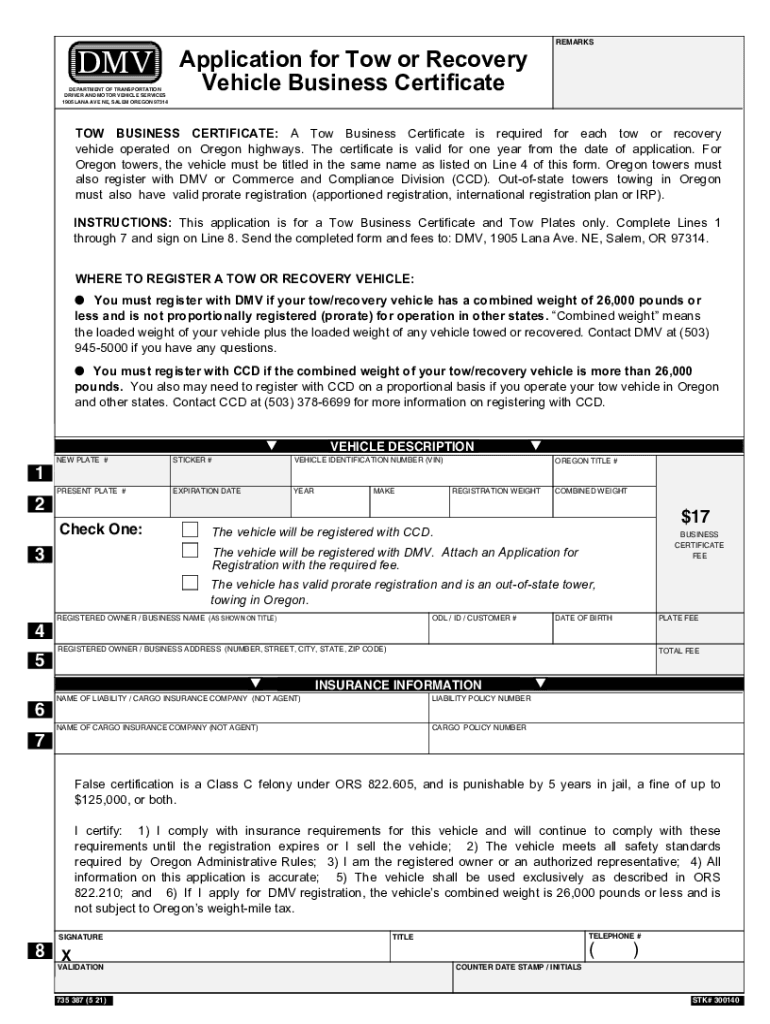
DMV DEPARTMENT OF TRANSPORTATION DRIVER AND MOTOR VEHICLE SERVICES 1905 LANA AVE NE, SALEM OREGON 97314Clear FormREMARKSApplication for Tow or Recovery Vehicle Business CertificateTOW BUSINESS CERTIFICATE:.
Loading

Open form follow the instructions

Easily sign the form with your finger

Send filled & signed form or save
How to use or fill out the Oregon Driver & Motor Vehicle Services online
This guide provides step-by-step instructions on how to fill out the Oregon Driver & Motor Vehicle Services application for a Tow Business Certificate. Follow these instructions to ensure your application is completed accurately and efficiently.
Follow the steps to complete your application successfully.
- Click ‘Get Form’ button to access the application for the Tow Business Certificate.
- Begin filling out Line 1 by providing the vehicle description, including the new plate number, sticker number, vehicle identification number (VIN), present plate number, expiration date, year, and Oregon title number.
- Proceed to Line 2, where you need to check one of the options that indicates whether the vehicle will be registered with DMV or CCD, including necessary fees.
- Fill out Line 3 based on the registration status; it should reflect whether out-of-state towers are using valid prorate registration for towing in Oregon.
- On Line 4, enter the registered owner or business name as shown on the title, along with the ODL/ID/customer number and their date of birth.
- Complete Line 5 by providing the registered owner's or business's address, including the number, street, city, state, and ZIP code.
- On Line 6, enter the insurance information, including the name of the liability and cargo insurance companies, along with their respective policy numbers.
- Finally, on Line 8, sign the application, certifying that all information is accurate and complies with the requirements. Ensure to provide your telephone number and title.
- Once all fields are filled out, save the form, download or print it, and send the completed application along with the required fees to DMV at the specified address.
Submit your application online today to streamline your process for obtaining a Tow Business Certificate!
Experience a faster way to fill out and sign forms on the web. Access the most extensive library of templates available.
Related content
Find benefits and services from the State of Oregon for children, families in need...
service equipment. EVSE. Charging infrastructure for electric vehicles. This broad term...
The Governor Nelson A. Rockefeller Empire State Plaza is a complex of several state...
Use professional pre-built templates to fill in and sign documents online faster. Get access to thousands of forms.
If you believe that this page should be taken down, please follow our DMCA take down process here.
This form is available in several versions. Select the version you need from the drop-down list below.