Loading
Get Wi Docketing Statement
How it works
-

Open form follow the instructions
-

Easily sign the form with your finger
-

Send filled & signed form or save
How to fill out the Wi Docketing Statement online
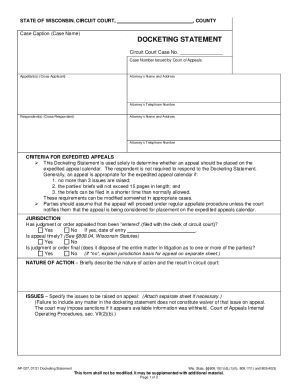
Filling out the Wi Docketing Statement is a necessary step for initiating an appeal within the Wisconsin circuit court system. This guide provides comprehensive instructions for users to complete the form accurately and efficiently online.
Follow the steps to complete the Wi Docketing Statement online.
- Click ‘Get Form’ button to obtain the Docketing Statement and display it in the editing interface.
- Begin by entering the case caption (case name) at the top of the form, ensuring it matches the case title as filed in court.
- Input the circuit court case number and the case number issued by the Court of Appeals in the designated fields.
- Provide the attorney’s name, address, and telephone number for the appellant(s) (cross-applicant).
- Similarly, enter the name, address, and telephone number of the attorney for the respondent(s) (cross-respondent).
- Review the criteria for expedited appeals and check the boxes according to your situation, confirming whether your appeal meets the specified requirements.
- Address the jurisdiction section by indicating if the judgment or order has been entered and if the appeal is timely, providing the date of entry if applicable.
- Describe the nature of the action and the outcome in the circuit court clearly and concisely.
- Specify the issues you plan to raise on appeal. If space is insufficient, you may attach a separate sheet.
- Indicate the standard of review for each issue, citing relevant authority as needed.
- Decide if you wish to have the appeal placed on the expedited appeals calendar and note if you are requesting oral argument.
- List any trial court action parties that will not participate in this appeal along with their attorneys’ names and contact information.
- If applicable, indicate knowledge of any pending or completed appeals related to the same or companion trial court case.
- Complete the signature section by providing the name of the person preparing the Docketing Statement, along with their printed name, email address, and date.
- Ensure to attach the necessary trial court documents, including the judgment or order, findings of fact, and any opinions related to the judgment.
- Finally, save changes, download, print, or share the completed form as required.
Begin the process of filing your Wi Docketing Statement online today.
A summary disposition is a summary opinion in order form and disposes of an appeal that has been briefed and submitted for consideration. Summary dispositions released since January 1, 2013 are available on this site. Note: Summary disposition orders will not be published and may not be cited under Wis.