Loading
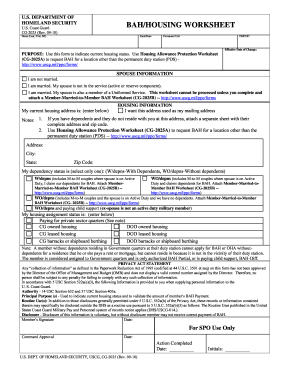
Get Cg 2025
How it works
-

Open form follow the instructions
-

Easily sign the form with your finger
-

Send filled & signed form or save
How to fill out the Cg 2025 online
Filling out the Cg 2025 form is essential for individuals in the U.S. Coast Guard to indicate their current housing status accurately. This guide provides clear, step-by-step instructions to ensure you successfully complete the form online.
Follow the steps to fill out the Cg 2025 online successfully.
- Click the ‘Get Form’ button to obtain the Cg 2025 form and open it in the editor.
- Begin by filling in your name in the format of Last, First, Middle Initial.
- Enter your rank or rate in the designated field.
- Provide your permanent unit information in the relevant section.
- Input your EMPLID (Employee ID Number).
- Indicate the effective date of any changes you are reporting.
- Select your marital status from the options provided, ensuring to follow any instructions that require additional documentation if you are married to another service member.
- Fill in your current housing address, including city, state, and zip code.
- Decide whether you want the given address used as your mailing address and make sure to list the details of dependents not residing with you if applicable.
- Select your dependency status appropriately by choosing either 'With Dependents' or 'Without Dependents'.
- Provide information regarding your housing assignment status by selecting one of the given options.
- Review all the provided information for accuracy and completeness.
- Once you have completed all the sections, save your changes, and you may choose to download, print, or share the completed form as necessary.
Start completing your Cg 2025 form online today to ensure your housing status is accurately reported.