Loading
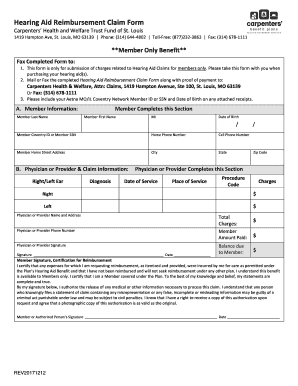
Get Hearing Aid Reimbursement Claim Form - Carpdc.org:82
How it works
-

Open form follow the instructions
-

Easily sign the form with your finger
-

Send filled & signed form or save
How to fill out the Hearing Aid Reimbursement Claim Form - Carpdc.org:82 online
Filing a hearing aid reimbursement claim can be straightforward when you have guidance. This step-by-step guide will help you navigate the Hearing Aid Reimbursement Claim Form and ensure you complete it correctly.
Follow the steps to effectively complete your reimbursement claim form.
- Click ‘Get Form’ button to obtain the form and open it for editing.
- Begin by filling out the Member Information section. Enter your last name, first name, middle initial, date of birth, Coventry ID or social security number, home phone number, cell phone number, home address, city, state, and zip code.
- Proceed to the Physician or Provider & Claim Information section. Indicate whether the claim is for the right or left ear and provide the diagnosis along with the date of service and place of service.
- Input the procedure code and charges for both the right and left ear, listing the respective amounts clearly.
- Next, include the physician or provider’s name, address, and phone number. Ensure the physician or provider signs and dates the form as required.
- Calculate and write the total charges, the amount you paid, and any balance due to you as the member.
- In the Member Signature section, certify that the expenses were incurred for care permitted under the plan’s Hearing Aid Benefit by signing and dating the form.
- Once you have filled out the entire form, review it for accuracy. You may then save your changes, download, print, or share the completed form as needed.
Complete your Hearing Aid Reimbursement Claim Form online today for efficient processing.