Loading
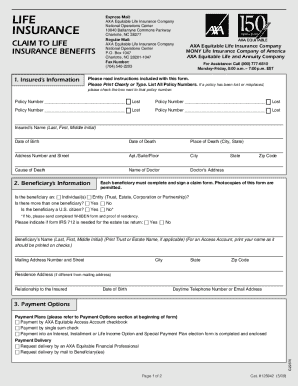
Get Axa Life Insurance Claims
How it works
-

Open form follow the instructions
-

Easily sign the form with your finger
-

Send filled & signed form or save
How to fill out the Axa Life Insurance Claims online
Filing a claim for life insurance benefits can be a challenging process, especially during difficult times. This guide provides clear and concise instructions for completing the Axa Life Insurance Claims form online, ensuring that you can navigate the process with confidence.
Follow the steps to successfully complete your claim
- Press the ‘Get Form’ button to access the form and open it in your preferred editor.
- Begin by providing the insured's information in section one. Ensure you fill in all required fields, including the insured's name, date of birth, date of death, place of death, and cause of death.
- In the beneficiary's information section, indicate if the beneficiary is an individual or an entity. Also, complete all pertinent details such as name, mailing address, relationship to the insured, and contact information.
- Explore the payment options and select your preferred method. Choices include receiving a lump sum check, utilizing an AXA Equitable Access Account, or electing for installment payments. Ensure to read the descriptions provided for each option.
- Fill in the beneficiary's taxpayer identification number as federal law requires this information. Ensure accuracy to avoid any tax withholding on the benefits.
- Review and sign the form in the signatures section. Each beneficiary must complete their section and provide their signature, printed name, and date. If you are electing an AXA Equitable Access Account, sign your name as you typically would on a check.
- Lastly, confirm that you have included all necessary documentation required for submission, such as the death certificate and the original policy. Save your changes and prepare to submit the form as directed.
Complete your Axa Life Insurance Claims form online today to ensure timely processing of your claim.
Submitting a claim is easy. Log in to EquitableHealth.ca and click Submit a Claim . Fill out the interactive health or dental claim form. Attach your receipt and click Submit .