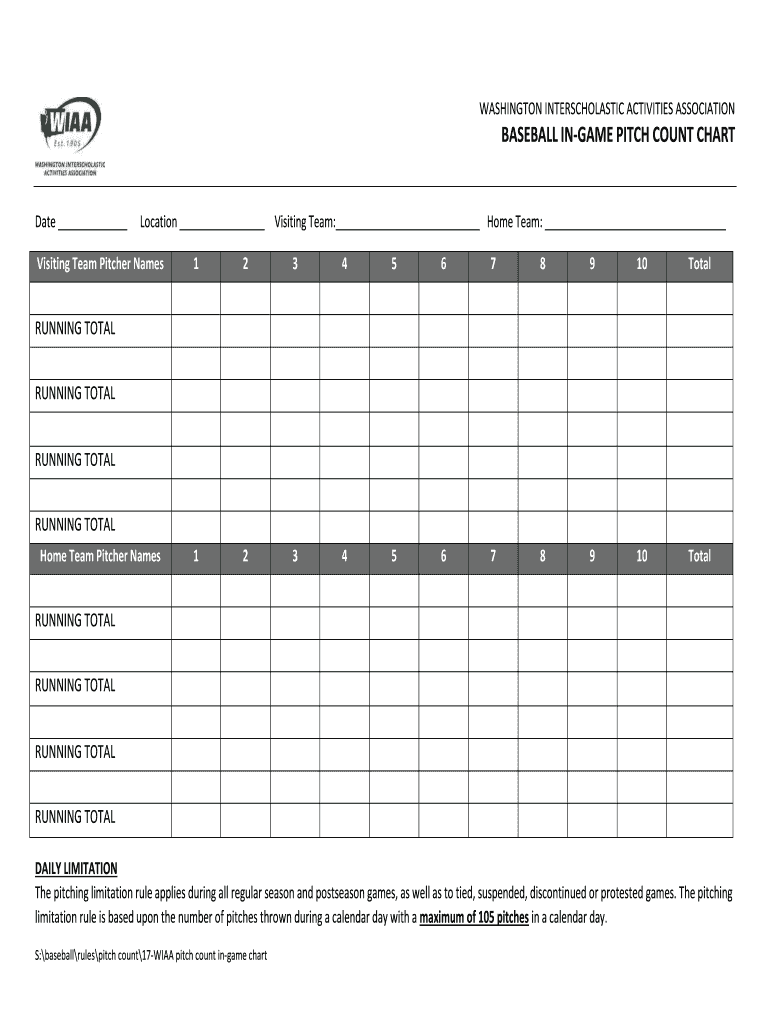
WASHINGTON INTERSCHOLASTIC ACTIVITIES ASSOCIATIONBASEBALL INGAME PITCH COUNT CHARTDate Location Visiting Team: Home Team: Visiting Team Pitcher Names12345678910Total12345678910TotalRUNNING TOTAL RUNNING.
Loading

Open form follow the instructions

Easily sign the form with your finger

Send filled & signed form or save
How to fill out the Pitch Count Chart online
Filling out the Pitch Count Chart is essential for tracking pitchers' performance and ensuring compliance with pitching limitations during games. This guide provides clear, step-by-step instructions on how to complete the form effectively.
Follow the steps to successfully complete the Pitch Count Chart.
- Click ‘Get Form’ button to obtain the Pitch Count Chart and access it in the editing tool.
- Begin by entering the date of the game in the designated field at the top of the chart.
- Next, input the location of the game in the location field, ensuring it is accurate to maintain proper records.
- Fill in the names of the visiting team and home team in their respective fields.
- For each visiting team pitcher, write down their names in the provided slots. Make sure to note up to ten pitchers, leaving space for their total pitches.
- As pitches are thrown, document the number of pitches for each pitcher in the total columns next to their names.
- After entering all pitches for visiting team pitchers, calculate and record the running total of pitches at the bottom of the section.
- Repeat steps 5 through 7 for the home team pitchers, ensuring accuracy as you document their names and totals.
- Be aware of the daily limitation: record the number of pitches and ensure that no pitcher exceeds the maximum of 105 pitches for the day.
- Once you have completed the chart, you can save changes, download, print, or share the finished form as needed.
Complete your Pitch Count Chart online to ensure accurate tracking and compliance during games.
Experience a faster way to fill out and sign forms on the web. Access the most extensive library of templates available.
Related content
Pitch Count: Use the following pitch count chart. The calendar week is Monday through, and...
8 Apr 2019 — As highlighted in this 2018 bad call ratio (BCR) graph, the line ... For...
A logarithmic scale (or log scale) is a way of displaying numerical data over a very wide...
Get answers to your most pressing questions about US Legal Forms API.
Ron Necciai - Wikipedia
One day of rest is required when throwing 31-50 pitches. It's up to two days' rest when a pitcher throws 51-75 pitches and goes to three days from 76-105 pitches. After 105 pitches, a pitcher will come out of the game. The number increases to 115 in the playoffs.
Pitch Counts And Days Rest? - The Complete Pitcher
Share This. The league age pitch counts for Little League Baseball® are as follows: Ages 13-16 95 pitches per day. Ages 11-12 85 pitches per day.
How many days of rest do pitchers need?
A starting pitcher in professional baseball usually rests three, four, or five days after pitching a game before pitching another.
Why can't modern starting pitchers consistently pitch on 2-3 days rest?
Starter Pitch Counts in 2010 Obviously, some of the pitch counts are small due to poor starter outings. But the general impression is that the starters for the 2010 teams appear to average about 100 pitches with some variability. For most teams, the percentage of pitch counts between 90 and 110 is 50 70 %.
Has there ever been a 27 pitch game?
Necciai is best remembered for the unique feat of striking out 27 batters in a nine-inning game, which he accomplished in the Class-D Appalachian League on May 13, 1952. He is the only pitcher ever to do so in a nine-inning, professional-league game.
ELI5: What is the difference between a starting pitcher, a relief ...
Starting with the 2019 season, an ERA under 4.00 is again considered good. The single-season record for the lowest ERA is held by Dutch Leonard, who in 1914 had an earned run average of 0.96, pitching 224.2 innings with a win-loss record of 19 5.
What makes a good closer pitcher?
These pitchers need to last 6+ innings (around 100 pitches) each time out. Closer/late inning reliever: Good velocity/movement, but not enough stamina or quality pitches to be a starter. You want these guys to go all out for one inning (10-25 pitches) and secure the win. ... The closer is usually your best relief pitcher.
Games Started (GS) | Glossary | MLB.com
Starters pitch about 3 times as many innings as relievers, so you simply want your best pitchers facing as many hitters as possible. ... This is often due to injury, but it can also just be a physiological or mental quality of the pitcher. Have only one or two effective pitches.
ELI5: What makes a pitcher an opener, a closer, or a mid-inning guy ...
A closer is typically a good pitcher as well, but because they typically never pitch more than an inning, it doesn't require any stamina. A lot of times, pitchers with just a lot of raw power will be a closer, and just throw it as hard as they can because they don't need to worry about getting tired.
Starting pitcher - Wikipedia
I think the major reasons for the extra days of rest is career longevity and potential for injury. As many of the answers have said pitchers can condition their body and particularly their arm to throw on shorter rest. Current Major League relief pitchers are conditioned to throw on several concurrent days.
Use professional pre-built templates to fill in and sign documents online faster. Get access to thousands of forms.
If you believe that this page should be taken down, please follow our DMCA take down process here.