Loading
Get Usps Ps 7381 2001-2026
How it works
-

Open form follow the instructions
-

Easily sign the form with your finger
-

Send filled & signed form or save
How to fill out the USPS PS 7381 online
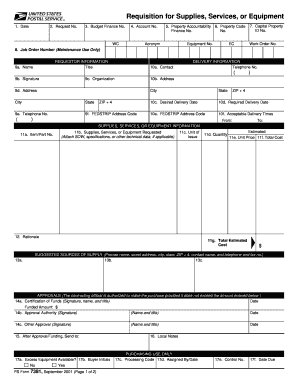
The USPS PS 7381 form is essential for requesting the purchase of supplies, services, or equipment. This guide provides clear, step-by-step instructions on how to fill out the form online, ensuring you complete each section accurately.
Follow the steps to successfully complete the USPS PS 7381 online.
- Press the ‘Get Form’ button to obtain the form and open it in the editor.
- In the first field, enter the date you are submitting the form.
- Fill in the request number, using the last two digits of the current fiscal year followed by the next local sequential number (e.g., 91-1).
- Input the budget finance number to indicate the funding office.
- Enter the applicable account number, differentiating between expense and capital accounts.
- Provide the property accountability finance number for the receiving office.
- If applicable, enter the property code and equipment number for capital items.
- Indicate the capital property ID number or the job order number as appropriate.
- In the requestor information section, provide your title, name, contact details, organization, and FEDSTRIP address code.
- Input the delivery information, including contact name, address, desired and required delivery dates, and acceptable delivery times.
- List the supplies, services, or equipment requested along with item/part number, unit of issue, quantity, unit price, and total estimated cost.
- Provide a rationale for why these supplies, services, or equipment are needed.
- Suggest sources of supply by providing contact details for manufacturers or suppliers.
- Obtain necessary approvals by having the certifying official and authority sign and date, if possible electronically.
- Identify where to send the document after approval.
- Fill in local notes if there are additional comments or information to be included.
- Finally, ensure all information is complete before saving changes, downloading, printing, or sharing the completed form.
Start filling out your USPS PS 7381 online today to streamline your requisition process.
A USPS notification of personnel action is a document that informs employees about changes to their employment status, such as job promotions or reassignments. This notification serves as an official record and ensures employees are aware of key transitions in their careers. Ensuring you understand your notification can guide you effectively through processes outlined in USPS PS 7381.