Loading
Form preview
  • US Legal Forms
  • Other Templates
  • More Forms
  • More Multi-State Forms
  • Bmo Investorline Beneficiary Form

Get Bmo Investorline Beneficiary Form

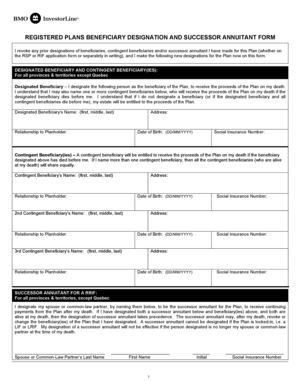
REGISTERED PLANS BENEFICIARY DESIGNATION AND SUCCESSOR ANNUITANT FORM I revoke any prior designations of beneficiaries, contingent beneficiaries and/or successor annuitant I have made for this Plan.

How it works

  1. Open form

    Open form follow the instructions

  2. Easily sign form

    Easily sign the form with your finger

  3. Share form

    Send filled & signed form or save

How to fill out the Bmo Investorline Beneficiary Form online

The Bmo Investorline Beneficiary Form is a crucial document for designating beneficiaries for your registered plans. This guide will provide step-by-step instructions to help you easily fill out the form online.

Follow the steps to complete the Bmo Investorline Beneficiary Form online.

  1. Click ‘Get Form’ button to obtain the Bmo Investorline Beneficiary Form and open it in your preferred editing tool.
  2. Begin by reading the introductory section that explains the revocation of prior beneficiary designations. Understanding the implications of your decisions is vital.
  3. In the 'Designated Beneficiary' section, enter the full name of the person you wish to designate as the beneficiary, including their first, middle, and last names.
  4. Specify the relationship of the designated beneficiary to you as the planholder to clarify all connections.
  5. Fill out the designated beneficiary's address accurately to ensure proper notification.
  6. Input the designated beneficiary's date of birth in the format DD/MM/YYYY to confirm their identity.
  7. Include the designated beneficiary's social insurance number for identification purposes in the required field.
  8. Proceed to the 'Contingent Beneficiary(ies)' section. Here you can enter the details of up to three contingent beneficiaries as necessary. Repeat the information fields: name, relationship, address, date of birth, and social insurance number for each.
  9. If applicable, designate a successor annuitant for your RRIF by entering their last name, first name, initials, and social insurance number. Ensure this person is your spouse or common-law partner.
  10. Review the cautionary notes at the end of the form regarding potential legal effects in Quebec, and ensure you understand your responsibilities with designations.
  11. Sign and date the form in the designated area. Ensure your signature is dated according to the suggested format DD/MM/YYYY.
  12. Finally, save changes, download, print, or share the completed form as needed to finalize your beneficiary designations.

Complete your Bmo Investorline Beneficiary Form online today for peace of mind regarding your estate planning.

Get form

Experience a faster way to fill out and sign forms on the web. Access the most extensive library of templates available.
Get form

Related content

Bank of Montreal - SEC.gov
Apr 8, 2011 — including BMO Nesbitt, BMO InvestorLine Inc. ("InvestorLine"), BMO...
Learn more

Related links form

GA GID-391-AL 2021 ID Notice To Complainants 2022 ID Notice To Complainants 2018 ID Form IDA-20 2020

Questions & Answers

Get answers to your most pressing questions about US Legal Forms API.

Contact support

Cash or margin Investments in a Cash account are flexible and can be taken out any time, while a Margin account lets you borrow money to help grow your portfolio. Great for: Active traders and anyone who's maxed out their RRSP and TFSA. No minimum balance.

The BMO InvestorLine Mobile Investing app gives you a comprehensive platform to place trades securely on the go. ... Download the app now and get the most out of your BMO Self-Directed account by enjoying the convenience of trading on the go.

An example of a beneficiary is the person who you leave your house to when you die. ... The institution or person who receives cash or an investment; typi-cally used to refer to people who inherit money or property through a will, or people who receive the proceeds from a life insurance policy, annuity, or trust.

A beneficiary is the person or entity you name in a life insurance policy to receive the death benefit. You can name: One person. Two or more people.

Choose your BMO InvestorLine Self-Directed account Before you start, decide what type of online trading account you'd like to open: TFSA. RESP. RRSP.

BMO Investorline Account Types: TFSA, RRSP, Non-Registered As one of Canada's top online brokers, BMO Investorline gives you access to essentially every type of investable account in Canada, including: Non-registered accounts (both CAD and USD) Margin Accounts.

General InstructionsWrite only one beneficiary on each line. Make sure that you write the full names of all beneficiaries. For example, if you name you children as beneficiaries, DO NOT merely write children on one of the lines; instead write the full names of each of your children on separate lines.

A beneficiary is the person or entity named in a life insurance policy, retirement plan or health savings account. This is the person that receives the benefit upon death. The beneficiary designation on file at the time of death is binding in the payment of your benefits.

You must go to your bank in person to add the beneficiary to your account. Bring along your photo ID, bank account information and beneficiary information. If you want to name multiple beneficiaries, you will need each beneficiary's name and address.

Complete your application. Review account types, required ID and documentation. Fund your account. Learn about minimum account balances (if applicable) Start trading. Experience online investing with. our award-winning platform.

Get This Form Now!

Use professional pre-built templates to fill in and sign documents online faster. Get access to thousands of forms.
Get form
If you believe that this page should be taken down, please follow our DMCA take down processhere.
Get Bmo Investorline Beneficiary Form
Get form
  • Adoption
  • Bankruptcy
  • Contractors
  • Divorce
  • Home Sales
  • Employment
  • Identity Theft
  • Incorporation
  • Landlord Tenant
  • Living Trust
  • Name Change
  • Personal Planning
  • Small Business
  • Wills & Estates
  • Packages A-Z
  • Affidavits
  • Bankruptcy
  • Bill of Sale
  • Corporate - LLC
  • Divorce
  • Employment
  • Identity Theft
  • Internet Technology
  • Landlord Tenant
  • Living Wills
  • Name Change
  • Power of Attorney
  • Real Estate
  • Small Estates
  • Wills
  • All Forms
  • Forms A-Z
  • Other Templates
  • Legal Hub
  • About Us
  • Help Portal
  • Legal Resources
  • Blog
  • Affiliates
  • Contact Us
  • Delete My Account
  • Site Map
  • Industries
  • Forms in Spanish
  • Localized Forms
  • State-specific Forms
  • Forms Kit
  • Real Estate Handbook
  • All Guides
  • Notarize
  • Incorporation services
  • For Consumers
  • For Small Business
  • For Attorneys
  • USLegal
  • FormsPass
  • pdfFiller
  • signNow
  • altaFlow
  • DocHub
  • Instapage
Form Packages
  • Adoption
  • Bankruptcy
  • Contractors
  • Divorce
  • Home Sales
  • Employment
  • Identity Theft
  • Incorporation
  • Landlord Tenant
  • Living Trust
  • Name Change
  • Personal Planning
  • Small Business
  • Wills & Estates
  • Packages A-Z
Form Categories
  • Affidavits
  • Bankruptcy
  • Bill of Sale
  • Corporate - LLC
  • Divorce
  • Employment
  • Identity Theft
  • Internet Technology
  • Landlord Tenant
  • Living Wills
  • Name Change
  • Power of Attorney
  • Real Estate
  • Small Estates
  • Wills
  • All Forms
  • Forms A-Z
  • Other Templates
Customer Service
  • Legal Hub
  • About Us
  • Help Portal
  • Legal Resources
  • Blog
  • Affiliates
  • Contact Us
  • Delete My Account
  • Site Map
  • Industries
  • Forms in Spanish
  • Localized Forms
  • State-specific Forms
  • Forms Kit
Legal Guides
  • Real Estate Handbook
  • All Guides
Prepared for you
  • Notarize
  • Incorporation services
Our Customers
  • For Consumers
  • For Small Business
  • For Attorneys
Our Sites
  • USLegal
  • FormsPass
  • pdfFiller
  • signNow
  • altaFlow
  • DocHub
  • Instapage
Social Media
Call us now toll free:
+1 833 426 79 33
As seen in:
© Copyright 1999-2026 airSlate Legal Forms, Inc. 17 Station Street, Ste. 203, Brookline, MA 02445
  • Your Privacy Choices
  • Terms of Service
  • Privacy Notice
  • Content Takedown Policy
  • Bug Bounty Program