Loading
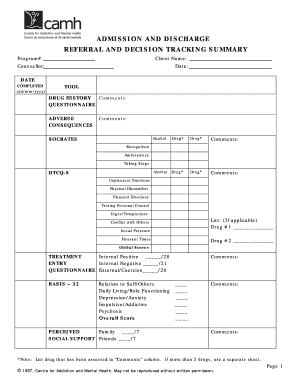
Get Admission & Discharge Referral And Decision Tracking Summary Pdf - Adat. Clinical Tool For
How it works
-

Open form follow the instructions
-

Easily sign the form with your finger
-

Send filled & signed form or save
How to fill out the Admission & Discharge Referral And Decision Tracking Summary PDF - ADAT. Clinical Tool online
Filling out the Admission & Discharge Referral And Decision Tracking Summary PDF - ADAT. Clinical Tool is an essential process for ensuring accurate documentation and effective treatment referral. This guide provides comprehensive, step-by-step instructions for completing the form online.
Follow the steps to accurately complete the ADAT clinical tool.
- Press the ‘Get Form’ button to access the document and open it in your preferred PDF editor.
- In the first section, enter the program number in the space provided on the form. This identifier is crucial for tracking the client's admission and discharge.
- Fill in the client's name in the designated area. It is important to ensure that the spelling is correct and matches official documentation.
- Provide the counsellor's name in the corresponding field, ensuring that the individual’s name is accurate for future references.
- Date the document accurately by entering the current date in the specified format (dd/mm/yyyy). This date signifies when the form was completed.
- Complete the drug history section. List any relevant drugs under the appropriate headings and provide comments as necessary regarding the client’s history with these substances.
- In the 'SOCRATES' section, fill out the various areas related to alcohol and drugs, providing comments in the specified areas to give a clearer picture of the client's situation.
- Move on to the treatment questionnaire. You need to indicate internal positives and negatives by marking the appropriate scores and providing any comments that could aid in understanding the client’s treatment needs.
- Complete the BASIS-32 section by assessing and filling in responses about relation to self/others, daily living, and other psychological factors.
- Address the concerns from the health screening form in the provided space. Make sure to detail any issues that may warrant further attention.
- Check all applicable guidelines recommended for referral. Indicate acceptance or denial for each suggested service, ensuring clarity for future reference.
- If any guidelines were not followed, provide an explanation in the available space, which helps in documenting the rationale for treatment decisions.
- Add any additional clinical notes in the space provided. If more space is needed, include a third page as indicated.
- Finally, the counsellor should sign the document and date it to authenticate the information provided. This signature is vital for the document's validity.
- Once you have completed all sections, review the document for accuracy. You can then save your changes, download, print, or share the form as necessary.
Start completing your Admission & Discharge Referral And Decision Tracking Summary PDF online today!
Admittance refers to the physical act of entering a place, while admission means being granted the privilege of participating in an event or activity.
Industry-leading security and compliance
US Legal Forms protects your data by complying with industry-specific security standards.
-
In businnes since 199725+ years providing professional legal documents.
-
Accredited businessGuarantees that a business meets BBB accreditation standards in the US and Canada.
-
Secured by BraintreeValidated Level 1 PCI DSS compliant payment gateway that accepts most major credit and debit card brands from across the globe.