Loading
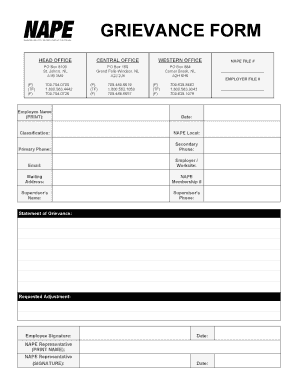
Get Canada Nape Grievance Form 2021-2026
How it works
-

Open form follow the instructions
-

Easily sign the form with your finger
-

Send filled & signed form or save
How to fill out the Canada NAPE Grievance Form online
Completing the Canada NAPE Grievance Form online is a straightforward process that ensures your grievances are addressed in a timely manner. This guide will assist you with each section of the form, providing clear instructions tailored to your needs.
Follow the steps to complete the Canada NAPE Grievance Form online.
- Press the ‘Get Form’ button to access the form and open it in your document editor.
- Fill in your personal details. Start with your full name, date, classification, NAPE local, primary and secondary phone numbers, email address, employer/worksite, mailing address, NAPE membership number, supervisor's name, and supervisor's phone number.
- In the statement of grievance section, clearly describe the nature of your grievance. Be as detailed as possible to provide a complete picture of your issue.
- Next, state your requested adjustment. This section allows you to specify what outcome you are seeking regarding your grievance.
- Sign and date the form at the bottom where indicated as 'Employee Signature'.
- If applicable, have a NAPE representative print their name and sign the form. Ensure this section is filled out completely.
- Once all required fields are filled out, you can save the document, download a copy, print it, or share it as needed.
Complete your grievance form online today to ensure your concerns are heard.
A grievance is generally defined as a claim by an employee that he or she is adversely affected by the misinterpretation or misapplication of a written company policy or collectively bargained agreement. To address grievances, employers typically implement a grievance procedure.