Loading
Form preview
  • US Legal Forms
  • Other Templates
  • More Forms
  • More Multi-State Forms
  • Commercial Backwater Valve Cert - Spotsylvania.va.us

Get Commercial Backwater Valve Cert - Spotsylvania.va.us

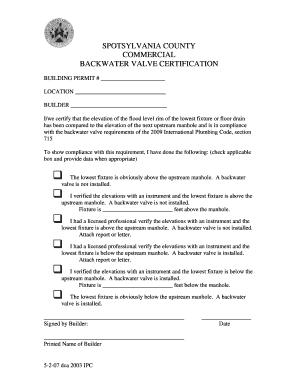
SPOTSYLVANIA COUNTY COMMERCIAL BACKWATER VALVE CERTIFICATION BUILDING PERMIT # LOCATION BUILDER I/we certify that the elevation of the flood level rim of the lowest fixture or floor drain has been.

How it works

  1. Open form

    Open form follow the instructions

  2. Easily sign form

    Easily sign the form with your finger

  3. Share form

    Send filled & signed form or save

How to fill out the Commercial Backwater Valve Cert - Spotsylvania.va.us online

Filling out the Commercial Backwater Valve Certification form is an important step in ensuring compliance with plumbing codes in Spotsylvania County. This guide provides clear instructions for users to accurately complete the form online.

Follow the steps to successfully complete the certification form.

  1. Click the ‘Get Form’ button to obtain the Commercial Backwater Valve Certification form and open it in the designated editor.
  2. Enter the building permit number in the designated field. This is crucial for identifying your specific project.
  3. Fill in the location of the property where the installation is taking place. Be as specific as possible to avoid any ambiguities.
  4. Provide the name of the builder responsible for the project in the appropriate section. Ensure that this is your full legal name.
  5. Review the certification statement. Make sure that the elevation of the flood level rim of the lowest fixture or floor drain has been compared properly to the elevation of the next upstream manhole.
  6. Select the applicable box that indicates your verification method regarding the flood level elevation. If the lowest fixture is above the upstream manhole, indicate if a backwater valve is installed. If applicable, fill in the specific elevation details.
  7. If a licensed professional verified the elevations, ensure to attach their report or letter as instructed.
  8. Provide the date of signing and ensure that the form is signed by the builder. This serves as an official declaration of the information provided.
  9. Once all fields are completed, you may save your changes, download a copy of the form, print it, or share it as needed.

Complete your Commercial Backwater Valve Certification online today to ensure compliance and facilitate your building project.

Get form

Experience a faster way to fill out and sign forms on the web. Access the most extensive library of templates available.
Get form

Related content

Hydrant & Construction Meter Rental | Stafford...
The bulk water permit and a current vehicle backflow inspection certificate must be in the...
Learn more
Contract Document - VCU Procurement - Virginia ...
Mar 5, 2018 — Your firm's contract with Virginia Commonwealth University (VCU) for Turf...
Learn more
Per- and Polyfluoroalkyl Substances (PFAS)...
Apr 1, 2020 — or contact with commercial and consumer products containing PFAS, or (4)...
Learn more

Related links form

YMCA OVERNIGHT CAMP SUMMER THEMES - Camp Ymca SECURITY DEPOSIT OFFSET STATEMENT - MegaDoxcom Application For Transport Facility New York City Police Department Verrazano 10-13 Association PO ...

Get This Form Now!

Use professional pre-built templates to fill in and sign documents online faster. Get access to thousands of forms.
Get form
If you believe that this page should be taken down, please follow our DMCA take down processhere.
Get Commercial Backwater Valve Cert - Spotsylvania.va.us
Get form
  • Adoption
  • Bankruptcy
  • Contractors
  • Divorce
  • Home Sales
  • Employment
  • Identity Theft
  • Incorporation
  • Landlord Tenant
  • Living Trust
  • Name Change
  • Personal Planning
  • Small Business
  • Wills & Estates
  • Packages A-Z
  • Affidavits
  • Bankruptcy
  • Bill of Sale
  • Corporate - LLC
  • Divorce
  • Employment
  • Identity Theft
  • Internet Technology
  • Landlord Tenant
  • Living Wills
  • Name Change
  • Power of Attorney
  • Real Estate
  • Small Estates
  • Wills
  • All Forms
  • Forms A-Z
  • Other Templates
  • Legal Hub
  • About Us
  • Help Portal
  • Legal Resources
  • Blog
  • Affiliates
  • Contact Us
  • Delete My Account
  • Site Map
  • Industries
  • Forms in Spanish
  • Localized Forms
  • State-specific Forms
  • Forms Kit
  • Real Estate Handbook
  • All Guides
  • Notarize
  • Incorporation services
  • For Consumers
  • For Small Business
  • For Attorneys
  • USLegal
  • FormsPass
  • pdfFiller
  • signNow
  • altaFlow
  • DocHub
  • Instapage
Form Packages
  • Adoption
  • Bankruptcy
  • Contractors
  • Divorce
  • Home Sales
  • Employment
  • Identity Theft
  • Incorporation
  • Landlord Tenant
  • Living Trust
  • Name Change
  • Personal Planning
  • Small Business
  • Wills & Estates
  • Packages A-Z
Form Categories
  • Affidavits
  • Bankruptcy
  • Bill of Sale
  • Corporate - LLC
  • Divorce
  • Employment
  • Identity Theft
  • Internet Technology
  • Landlord Tenant
  • Living Wills
  • Name Change
  • Power of Attorney
  • Real Estate
  • Small Estates
  • Wills
  • All Forms
  • Forms A-Z
  • Other Templates
Customer Service
  • Legal Hub
  • About Us
  • Help Portal
  • Legal Resources
  • Blog
  • Affiliates
  • Contact Us
  • Delete My Account
  • Site Map
  • Industries
  • Forms in Spanish
  • Localized Forms
  • State-specific Forms
  • Forms Kit
Legal Guides
  • Real Estate Handbook
  • All Guides
Prepared for you
  • Notarize
  • Incorporation services
Our Customers
  • For Consumers
  • For Small Business
  • For Attorneys
Our Sites
  • USLegal
  • FormsPass
  • pdfFiller
  • signNow
  • altaFlow
  • DocHub
  • Instapage
Social Media
Call us now toll free:
+1 833 426 79 33
As seen in:
© Copyright 1999-2026 airSlate Legal Forms, Inc. 17 Station Street, Ste. 203, Brookline, MA 02445
  • Your Privacy Choices
  • Terms of Service
  • Privacy Notice
  • Content Takedown Policy
  • Bug Bounty Program