Loading
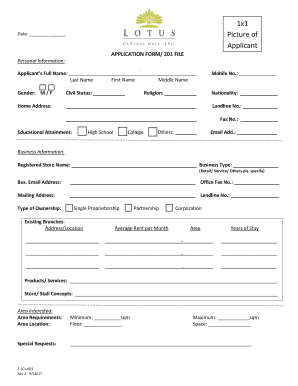
Get Application Form/ 201 File
How it works
-

Open form follow the instructions
-

Easily sign the form with your finger
-

Send filled & signed form or save
How to fill out the APPLICATION FORM/ 201 FILE online
Filling out the APPLICATION FORM/ 201 FILE online can streamline your application process. This guide provides a clear, step-by-step approach to accurately completing each section of the form, ensuring all necessary information is included.
Follow the steps to fill out the APPLICATION FORM/ 201 FILE online
- Press the ‘Get Form’ button to access the APPLICATION FORM/ 201 FILE and open it in your preferred interface.
- Fill in your personal information, starting with your full name by entering your last name, first name, and middle name. Include your mobile number, gender, civil status, religion, nationality, and home address.
- Provide your contact details, such as your landline number, fax number (if applicable), and email address.
- In the business information section, enter your registered store name, business type, business email address, office fax number, and mailing address. Include your landline number here as well.
- Specify your type of ownership (Single Proprietorship, Partnership, Corporation). If you have existing branches, list their addresses.
- Fill in details about your business, including average rent per month, years of stay at the location, and products/services offered.
- Describe the store/stall concepts, area interested, area requirements, and area location including minimum and maximum square meters.
- Provide special requests if any, including a brief description of the concept and its products.
- Indicate your target market and the age bracket of your potential customers. Complete the merchandise description and merchandise mix percentages.
- Enter the area requirements for shop units or existing branches and provide information about the average monthly sales and years in business.
- Review all entered data for accuracy. Once completed, you can save the document, download it for printing, or share it as necessary.
Complete the APPLICATION FORM/ 201 FILE online to ensure a smooth application process.
Why is the 201 File of Employees called the 201 File? Based on my research , It's a term borrowed from the military, specifically the US Army. The US Army's folder for personnel record is called the DA Form 201, or 201 File.