Loading
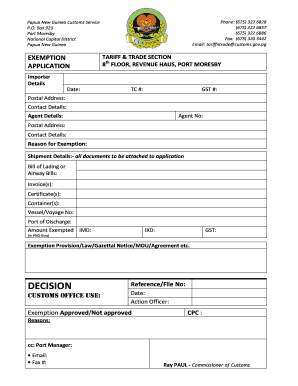
Get Customs Png
How it works
-

Open form follow the instructions
-

Easily sign the form with your finger
-

Send filled & signed form or save
How to fill out the Customs Png online
Filling out the Customs Png form is an important step for individuals and businesses seeking an exemption from customs duties in Papua New Guinea. This guide provides a clear, step-by-step process to help you complete the form accurately and efficiently.
Follow the steps to complete the Customs Png form with ease.
- Click ‘Get Form’ button to obtain the form and open it in your preferred digital editor.
- Begin by entering the date of the application at the top of the form.
- Fill in the TC number and GST number if applicable.
- Provide the postal address and contact details for the importer, making sure to include accurate information.
- If you are using an agent, include their agent number, postal address, and contact details.
- Clearly state the reason for the exemption in the designated section.
- List all shipment details, including attaching relevant documents like the bill of lading or airway bills, invoices, certificates, and container numbers.
- Indicate the vessel or voyage number and the port of discharge.
- Enter the amounts exempted in PNG Kina, specifying the IMD and IXD, along with any GST exemptions.
- Reference the exemption provision or applicable law, including any gazettal notices or agreements.
- For Customs office use, leave space for the reference file number, date, action officer, and approval status.
- Finally, ensure you save your changes, and download, print, or share the form as needed.
Take the next step and fill out your forms online for a smoother process.

Be fit and proper persons; Have no criminal record, including offences against Customs Act 1951 Business Act 1998; Within the last three years have completed a course of study or instruction and acquired experience that in the opinion of PNG Customs fits them to be a customs broker; and.