Loading
Get Doc Pto/sb/22 2020-2026
How it works
-

Open form follow the instructions
-

Easily sign the form with your finger
-

Send filled & signed form or save
How to fill out the DoC PTO/SB/22 online
Filling out the DoC PTO/SB/22 form online can seem daunting, but with clear guidance, it becomes more manageable. This comprehensive guide will walk you through each section of the form, ensuring you have all the necessary information to complete your petition for an extension of time.
Follow the steps to successfully complete your DoC PTO/SB/22 online
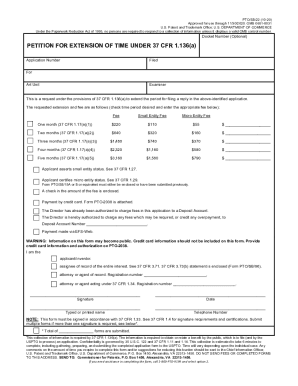
- Click the ‘Get Form’ button to access the DoC PTO/SB/22 form and open it in your online editor.
- Fill in the docket number, application number, and filing date if applicable. These fields help identify your petition and application.
- Specify the Art Unit and the Examiner's name to ensure your request is directed to the appropriate personnel.
- Select the desired extension period by checking the corresponding box for one to five months. Enter the appropriate fee that corresponds to the chosen period.
- Indicate your entity status by checking the appropriate box for small entity or micro entity status, as applicable. Ensure that any required previous forms are enclosed or noted.
- Choose your payment method by indicating whether you are enclosing a check, using a credit card (PTO-2038), or charging to a Deposit Account. Fill out the necessary authorization sections.
- Provide your role in the application process by selecting 'applicant/inventor,' 'assignee of record,' or 'attorney/agent of record.' Include the registration number if applicable.
- Sign and date the form where indicated. Your signature must comply with the requirements stipulated in the USPTO guidelines.
- Print, save changes, or share the completed form through your online document management tool to ensure it is submitted accurately.
Complete your DoC PTO/SB/22 online and submit it to the USPTO for processing.