Loading
Get Fmcsa Oce-46 2020-2026
How it works
-

Open form follow the instructions
-

Easily sign the form with your finger
-

Send filled & signed form or save
How to fill out the FMCSA OCE-46 online
Filling out the FMCSA OCE-46 form is an essential step for carriers, freight forwarders, or brokers seeking to request revocation of their granted authority. This guide provides clear and comprehensive instructions on how to complete the form online effectively.
Follow the steps to complete the FMCSA OCE-46 form online
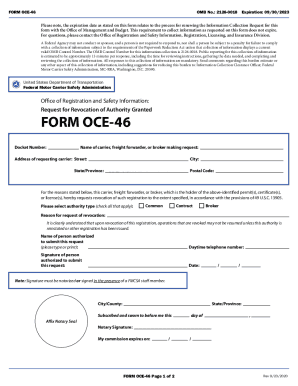
- Press the ‘Get Form’ button to access the FMCSA OCE-46 form and open it in the editor.
- In the first section, enter the docket number associated with your authority request. Make sure this number is accurate to ensure proper processing.
- Fill in the name of the carrier, freight forwarder, or broker making the request. Double-check the spelling for accuracy.
- Provide the street address of the requesting carrier, including city, state or province, and postal code. Ensure that this address reflects the official mailing address.
- Select the authority type by checking all applicable boxes: Common, Contract, or Broker. This section is crucial for identifying the revocation type.
- Clearly state the reason for the request for revocation in the space provided. Be as detailed and specific as possible.
- Enter the name of the person authorized to submit this request. Type or print their name legibly.
- Fill in the daytime telephone number of the authorized person for any follow-up communication.
- The authorized person's signature is required. Ensure it is notarized or signed in the presence of an FMCSA staff member.
- Input the date of the request, making sure it reflects the correct day, month, and year.
- In the last section, review all the entered information for completeness and accuracy before saving the form.
- Save any changes made to the form and prepare to download, print, or share it according to your needs.
Complete your FMCSA OCE-46 form online today and ensure compliance with federal requirements.