PRINT FORMSUBMITCOMMUNITY DEVELOPMENT AGENCY DEVELOPMENT & INSPECTIONS Permit Info: 7705282043 Inspection Request: 7705282073 Fire Marshall: 7705288310 Mechanical: 7705282159 Electrical: 7705282088.
Loading

Open form follow the instructions

Easily sign the form with your finger

Send filled & signed form or save
How to fill out the GA Subcontractor Permit Request - Cobb County online
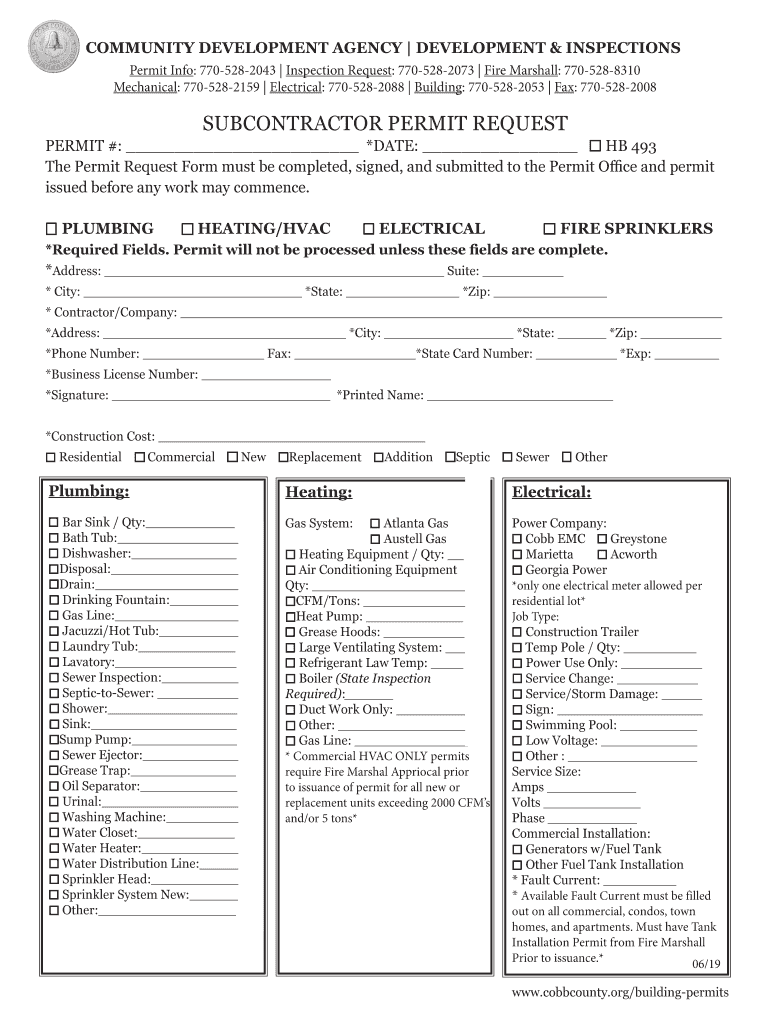
This guide provides clear instructions on completing the GA Subcontractor Permit Request for Cobb County. Whether you are a seasoned contractor or a new user, this comprehensive overview will ensure that you understand each section and field of the form.
Follow the steps to successfully complete your permit request
- Press the ‘Get Form’ button to access the permit request form and open it in your preferred digital document management tool.
- Begin by filling out the permit number and date at the top of the form. Make sure to complete all required fields marked with an asterisk, as your application will not be processed otherwise.
- Indicate the type of work you will be doing by selecting the appropriate box for plumbing, heating/HVAC, electrical, or fire sprinklers.
- Fill in the address details of the job site, including the street address, suite number (if applicable), city, state, and zip code.
- Provide your contractor or company name, address, city, state, zip code, and contact numbers. Ensure to include your state card number and its expiration date as well as your business license number.
- Sign the document and print your name below your signature. Input the construction cost and choose whether the project is residential or commercial, as well as its type such as new, replacement, or addition.
- In the plumbing section, list any specific plumbing items needed for the project and their respective quantities, such as sinks, water heaters, and toilets.
- For the heating section, specify the equipment types required, including air conditioning units and heating equipment. State the relevant quantities and any other crucial details.
- Select your power company from the provided options and enter any pertinent details related to job type, service size, and commercial installations, if applicable.
- Review all the information you've provided for accuracy. You can then save your changes, download, print, or share the completed form as needed.
Complete your GA Subcontractor Permit Request online now for a smooth and efficient permitting process.
Experience a faster way to fill out and sign forms on the web. Access the most extensive library of templates available.
Related content
Permits, Applications, Information requirements and Instructions are available for...
Vendors wishing to do business with Cobb County Government need to activate ... of the...
Cobb County, Georgia (Metro Atlanta) ... design and implementation of software packages...
Use professional pre-built templates to fill in and sign documents online faster. Get access to thousands of forms.
If you believe that this page should be taken down, please follow our DMCA take down process here.
This form is available in several versions. Select the version you need from the drop-down list below.