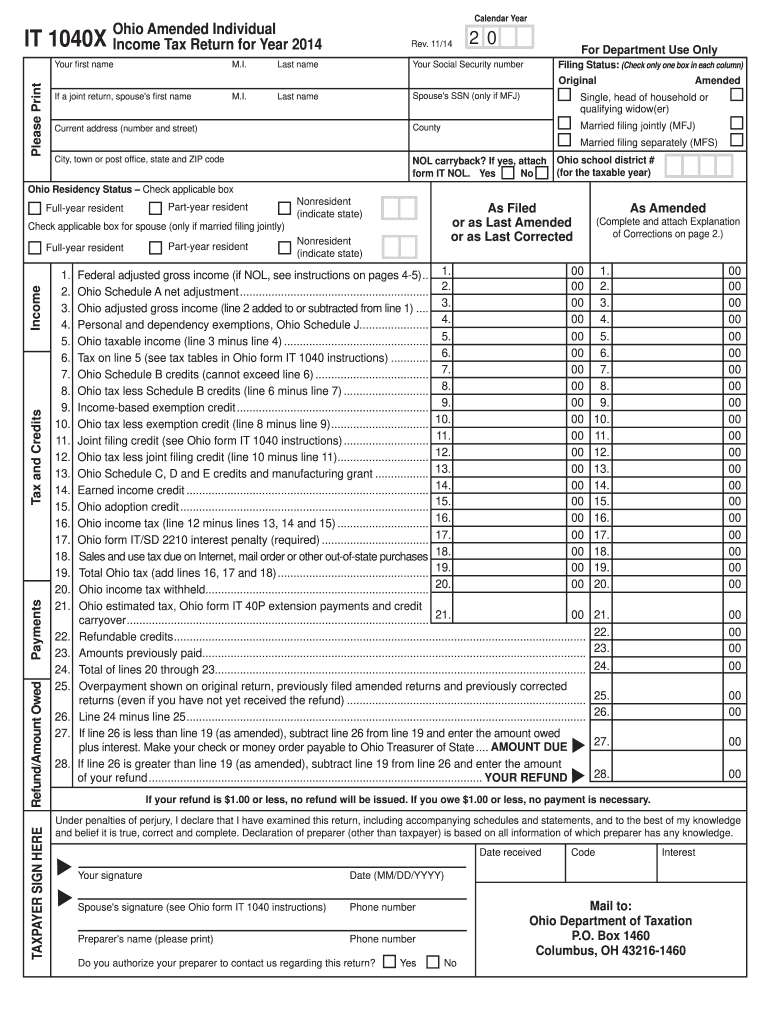
Amounts previously paid.......................................................................................................................... Total of lines 20 through 23...................................................................................................................... Overpayment shown on original return, previously filed amended returns and previously corrected returns (even if you have not yet received the refund) .
Loading

Open form follow the instructions

Easily sign the form with your finger

Send filled & signed form or save
How to fill out the OH ODT IT 1040X online
Filing an amended tax return can be a crucial step in correcting previous mistakes and ensuring compliance with tax regulations. The OH ODT IT 1040X is Ohio's amended individual income tax return, and this guide will help you navigate the process of completing the form online with clarity and precision.
Follow the steps to properly fill out the OH ODT IT 1040X
- Click ‘Get Form’ button to obtain the form and open it in the editor.
- Begin by entering your personal information in the designated fields, including your first name, middle initial, last name, and Social Security number. If you are filing jointly, provide your spouse's information as well.
- Indicate your filing status by checking the appropriate box for your situation: single, married filing jointly, or married filing separately.
- Select your Ohio residency status by checking the applicable box: full-year resident, part-year resident, or nonresident.
- Complete the income sections by entering your Federal adjusted gross income from your original return, followed by any adjustments from the Ohio Schedule A.
- Deduct personal and dependency exemptions according to the Ohio Schedule J, then calculate your Ohio taxable income.
- Determine your tax liability based on the Ohio tax tables as indicated in the Ohio form IT 1040 instructions.
- Record any applicable credits from Ohio Schedule B, and compute your total Ohio tax after applying these credits.
- If applicable, include any sales and use tax due on out-of-state purchases and sum all taxes to obtain your total Ohio tax.
- Indicate if you have any overpayments or refund claims, providing the necessary calculations based on previous filings.
- Review and complete the 'Reason and Explanation of Corrections' section, attaching documentation as required to support your amendments.
- Sign and date the form in the designated fields. Ensure all necessary information is provided before submitting.
- Once the form is completely filled out and reviewed, save your changes, download a copy for your records, and submit the completed form as directed by mail.
Start filing your Ohio amended individual income tax return online today.
Experience a faster way to fill out and sign forms on the web. Access the most extensive library of templates available.
Related content
May 10, 2022 — When filing your amended Ohio IT 1040 and/or SD 100, you must include a...
This paper uses micro data from individual tax returns audited during the 1971 cycle of...
Get answers to your most pressing questions about US Legal Forms API.
Will I get audited if I file an amended return?
Filing an amended return does not automatically trigger an audit. However, it may draw attention if there are significant changes to your income or deductions reported on your OH ODT IT 1040X. Being thorough and accurate in your reporting will certainly reduce the risk of any audits.
Can I file an Ohio amended return electronically?
Yes, you can file an Ohio amended return electronically under certain conditions. Ohio allows electronic filing for many tax forms, including the OH ODT IT 1040X, which can make the process more efficient for you. Check with your tax platform or software for compliance with electronic submission.
Is AGI box 1 or box 3?
Your AGI is located in box 1 of the 1040X form. It is essential to enter this information accurately to avoid delays or issues with your Ohio amended return. Reviewing your original return can help clarify your reporting when completing your OH ODT IT 1040X.
How do I fill out a 1040X amended tax return?
Filling out the Form 1040X involves specific steps, including sourcing your original 1040 as a reference. You’ll need to provide explanations for the changes and adjustments you are making. Utilizing platforms like uslegalforms can simplify this process, ensuring your OH ODT IT 1040X submission meets all requirements.
Do I use my AGI from my amended tax return?
When filing an OH ODT IT 1040X, you typically use the AGI from your original tax return, not the amended one. This consistency helps standardize your filings across the board. Make sure you have accurate records to guide you in entering this critical number.
What line is adjusted gross income on 1040X?
On the amended Form 1040X, your adjusted gross income is listed on line 1. This line reflects your AGI from your original return. Careful attention to this detail will support a successful filing of your OH ODT IT 1040X.
Where do I find my AGI on 1040x?
Your AGI appears on line 1 of the Form 1040X. It's important to carry over your AGI accurately from your original Form 1040 when filing an amended return. If you’re unsure about your numbers, verifying them can help ensure your Ohio tax adjustments through OH ODT IT 1040X go smoothly.
What line on 1040 shows adjusted gross income?
On the Form 1040, you can find your adjusted gross income, commonly referred to as AGI, reported on line 11. Understanding this line is crucial when you're working through your OH ODT IT 1040X amended return. If you have questions about ACCURATELY reporting data, consider using resources that guide you through the 1040X process.
Does 1040X have to be mailed?
If electronic filing is not an option for you, then yes, the 1040X must be mailed to the appropriate address. When sending your OH ODT IT 1040X by mail, ensure you follow all the guidelines for submission, including using the correct forms and including any necessary documentation. While mailing can feel slower than electronic options, it remains a valid and accepted method. Always check with your filing service for the best practices related to mailing your tax forms.
Why can't I file my amended return electronically?
You may be unable to file your amended return electronically for a variety of reasons. Common issues include the type of tax software you are using or specific complications with your original filing. The OH ODT IT 1040X often involves unique details that some platforms might not support electronically. If e-filing is not an option for you, carefully follow the instructions to mail your amended return.
Use professional pre-built templates to fill in and sign documents online faster. Get access to thousands of forms.
If you believe that this page should be taken down, please follow our DMCA take down process here.